
Switching From Zendesk to Flat-Rate Help Desk Software: A Practical Migration Guide
If you're paying per agent for Zendesk and wincing every time HR mentions a new hire, you're not imagining things. Your help desk software bill really does climb every time you add a teammate. For many UK teams, it can rise faster than the budget comfortably allows, especially once you factor in currency conversion and VAT on top of published US pricing.
Switching to flat-rate customer support software such as Sonny can cut that bill dramatically while giving your entire team access—not just the people with a paid seat. For growing SaaS companies, e-commerce brands and software teams, unlimited-agent help desk software can make support costs more predictable without sacrificing essential features such as a shared inbox, live chat and email ticketing.
Here's the honest version of the good news: migrating from Zendesk is usually far less painful than people fear. How quickly it goes depends on how much history you're carrying and how many integrations you rely on. Many small teams export their Zendesk data, move the essentials into a new help desk tool within a few days, and run a short parallel period before fully cutting over. Larger or more customised setups can take longer, particularly if you have years of tickets, custom fields or complex automations to account for.
The hard part was never really the technology. It's choosing the right customer support software and following a clear Zendesk migration checklist so nothing slips through the cracks during the handoff.
Let's look at why teams start searching for Zendesk alternatives, what the real numbers look like in pounds—not just dollars—and exactly how to migrate your help desk software without losing a single customer conversation.
Why Teams Look for Zendesk Alternatives
I've talked to a lot of support and operations professionals who describe the same slow-building frustration with per-agent pricing. It's rarely one dramatic moment. It's death by a thousand invoices. Here's what tends to push teams towards a Zendesk alternative:
- Per-agent pricing punishes growth. Hiring a seasonal agent for the holiday rush or bringing on a part-time contractor shouldn't feel like a financial decision that needs a budget meeting, but with Zendesk, it often does.
- Add-ons and usage-based extras complicate budgeting. Zendesk's core plans are seat-based, but features such as advanced AI, automation bots, workforce management and QA tooling may be sold as separate add-ons with their own pricing. If your team relies on these features, forecasting next quarter's spend means tracking more than one moving part. Check which line items apply to your account before assuming your bill is simply seat price multiplied by headcount.
- Feature bloat means paying for tools you'll never touch. A five-person team doesn't need enterprise-grade workflow builders or advanced analytics suites designed for 200-agent call centres, but you may be paying for them to access the basic help desk features you actually need.
- Onboarding friction slows everything down. Long setup calls, sales demos and implementation timelines can feel wildly out of proportion for what should be straightforward customer support software.
- Teams start rationing seats instead of sharing visibility. When every login costs money, you may limit who can see customer conversations. That quietly undermines the whole point of having a shared inbox in the first place.
That last point is the one I hear about most. Support shouldn't be a walled garden where only the “official” agents can see what customers are saying. Your product manager, founder and customer success lead can all benefit from visibility into support conversations. Per-agent pricing actively discourages that kind of openness.
Picture a UK-based e-commerce brand preparing for Black Friday. It needs four extra pairs of hands for six weeks, then returns to a core team of eight. On a per-agent plan, that's a genuine budget conversation every year. With flat-rate help desk software, it becomes a non-event. That seasonal pattern, more than raw team size, is often what prompts teams to consider alternatives to Zendesk.
Comparing Zendesk and Flat-Rate Help Desk Software Pricing
Let's get concrete, because the pricing difference can be eye-opening once you run the numbers for your own team size. A quick caveat before we begin: pricing changes, currencies fluctuate and feature sets are not identical between tools. Treat the figures below as a starting framework rather than gospel. Always check current pricing pages directly and confirm VAT treatment for UK billing before committing.
Zendesk uses a per-agent subscription model, meaning your monthly bill scales directly with headcount. Based on publicly listed US pricing at the time of writing, plans have ranged from roughly $19 to $115+ per agent per month depending on the tier. That converts to approximately £15–£90+ per agent per month before VAT, although your actual invoice may differ based on Zendesk's UK or EU pricing, exchange rates and regional promotions.
Sonny, by contrast, lists a flat $19.99 per month—roughly £16 per month, excluding VAT—for unlimited agents and unlimited conversations. Verify current figures on each vendor's pricing page, since promotional pricing and currency conversion can change these numbers.
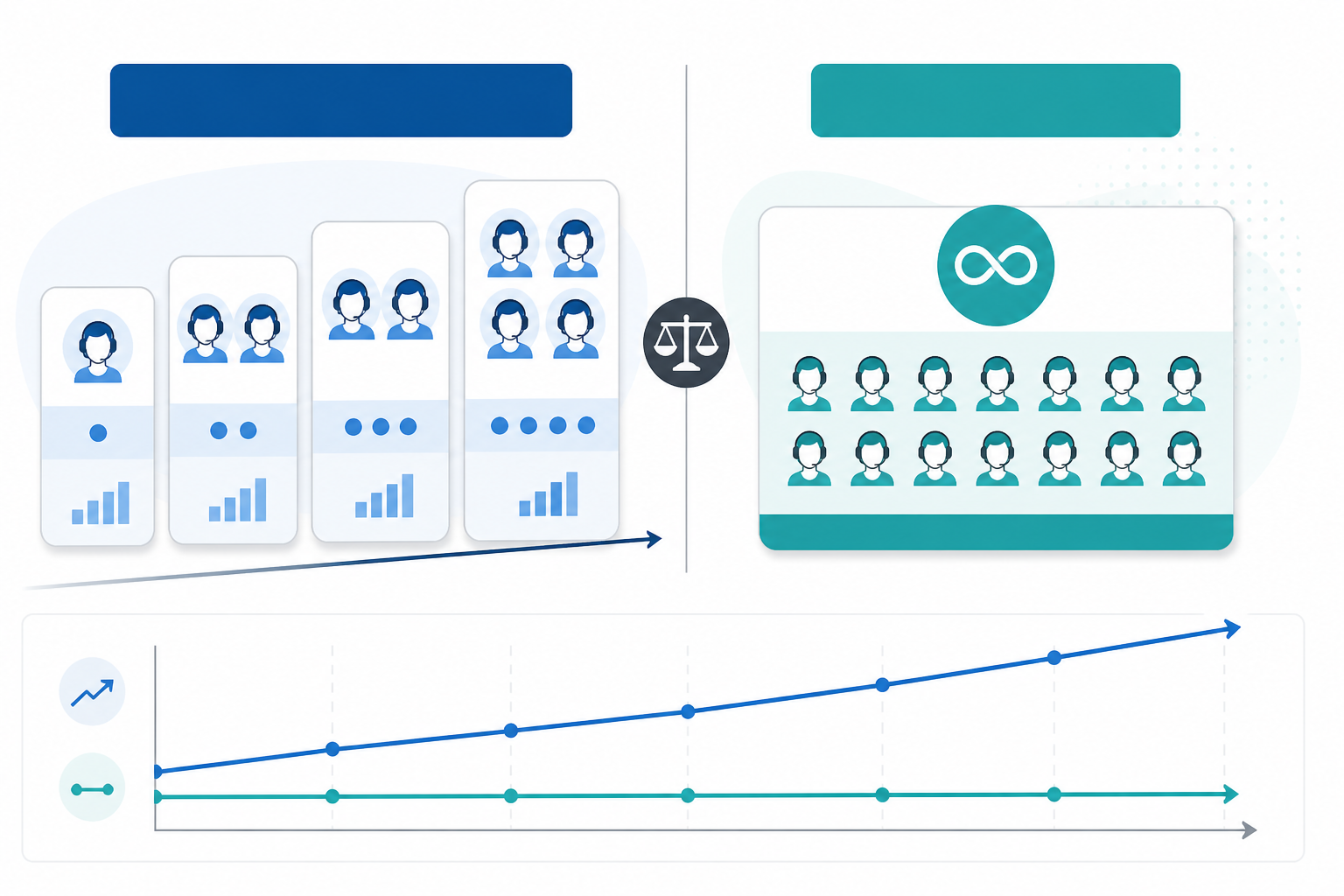 Text equivalent: Zendesk charges per agent per month, so costs rise in a straight line as headcount grows. Sonny charges one flat monthly fee regardless of how many agents you add, so its cost line stays flat across the chart.
Here's what the difference looks like in practice, using an illustrative $89 per agent—approximately £71 per agent—price point for Zendesk's Suite Growth tier billed annually. This is one specific tier among several. If you're on Zendesk's Team, Professional or Enterprise plans, the comparison will look different. Suite Growth also includes features such as light agents and some automation that a leaner tool may handle differently:
| Team size | Zendesk (approx. $89/agent/month, ~£71) | Sonny (flat $19.99/month, ~£16) |
|---|---|---|
| 10 agents | $890/month (~£712) | $19.99/month (~£16) |
| 25 agents | $2,225/month (~£1,780) | $19.99/month (~£16) |
| 50 agents | $4,450/month (~£3,560) | $19.99/month (~£16) |
For a 25-agent team, that's a rough difference between spending the equivalent of over £21,000 a year and spending under £200. Even accounting for feature differences, that's the kind of gap that makes finance teams pay attention. However, the gap only tells you something useful if the cheaper tool covers what your team needs day to day. That is why the feature comparison later in this guide matters just as much as the invoice.
What Is the Break-Even Point for Flat-Rate Help Desk Software?
Divide the flat-rate monthly fee by the per-agent monthly fee to estimate how many seats it takes before flat-rate pricing wins on subscription cost alone. Using the illustrative figures above, a $19.99 flat monthly fee is already comparable to roughly one agent at a $19 per-agent rate. At $55 or $89 per agent, the subscription break-even point is well below one agent.
In practice, almost any team beyond a solo founder may benefit from unlimited-agent pricing on cost alone. The calculation changes if you're comparing against Zendesk's cheapest tier or need enterprise features that a flat-rate tool does not offer. Run the calculation using your current per-agent rate, actual headcount and expected growth.
A few honest caveats are worth considering:
- “Unlimited agents” should mean full ticketing access, not a watered-down version for anyone past agent number three. Confirm this with the vendor in writing, along with what “unlimited conversations” covers, including attachments, storage limits and API calls.
- Watch for hidden costs such as automation limits, reporting tiers gated behind higher plans or add-ons for integrations you assumed were included.
- Compare total cost of ownership, not just the licence price. Factor in implementation time, training and any overlap period where you run two tools at once.
- Per-agent pricing is easier to forecast when staffing is completely stable. Flat-rate pricing becomes more attractive when you have seasonal hires, rotating specialists or occasional users such as managers who only need to check the inbox.
One more point is worth remembering: the most useful metric is not cost per agent but cost per resolved conversation. A cheaper licence does not help if it comes with clunky automation or slower reporting that makes your team less productive. The savings are worth investigating, but they only matter if the tool does the job for your specific workflow.
What You Gain and Lose When Switching From Zendesk
Let's be honest about the trade-offs, because no migration guide worth reading pretends there aren't any.
Benefits of Flat-Rate Customer Support Software
Predictable billing means no more surprise invoices when you onboard a new hire. Whole-team access means your entire company—not just the “official” agents—can see and contribute to customer conversations without seat-counting gymnastics.
Flat-rate tools such as Sonny generally advertise fast setup and native apps across desktop and mobile. Test these capabilities yourself during a trial rather than assuming they match every workflow you currently rely on in Zendesk.
For many small and mid-sized businesses, the potential benefits include:
- More predictable monthly support costs
- Unlimited agents and broader internal visibility
- Faster implementation than a complex enterprise help desk
- A shared inbox for email and other support channels
- Less administrative work when team size changes
Potential Drawbacks of a Zendesk Alternative
If you're a larger enterprise with deeply customised workflows, an extensive third-party integration marketplace or complex multi-department routing rules, Zendesk's higher tiers offer depth that leaner tools like Sonny are not built for. If your support operation genuinely needs that level of customisation, switching to flat-rate help desk software may mean workarounds or features you currently use disappearing entirely.
A flat-rate Zendesk alternative is often a good fit for small to mid-sized SaaS companies, e-commerce brands and software teams that need a shared inbox, live chat widget and email ticketing without enterprise complexity. If your current Zendesk setup feels like using a commercial kitchen to make toast, you're probably a good candidate.
If you're running a 200-person call centre with intricate escalation chains, you may want to stay with Zendesk for now—or plan a much more thorough evaluation before moving.
Sonny's core feature set, as listed on its own site, includes a unified shared inbox, live chat widget, email-to-ticket forwarding, internal notes, tagging, filtering and reporting on response times and team performance. These features cover what many growing teams use day to day. There's also an optional AI-powered copilot trained on your company documents.
As with any vendor claim, test these features against your actual ticket volume and workflows during a trial rather than assuming parity with Zendesk out of the box.
GDPR and Data Protection Considerations for UK Teams
If you're a UK or EU-based team, ask any customer support software vendor about its Data Processing Agreement, where customer data is stored and processed, GDPR compliance and its subprocessor list. This matters for any help desk software handling personal data, regardless of which tool you choose.
How to Migrate Your Zendesk Conversation History
This is the part that sounds scarier than it usually is, but it does deserve real planning rather than a rushed weekend project. The process can be broken into three phases: pre-migration, cutover and post-cutover.
Pre-Migration Checklist
- Export your Zendesk ticket history and customer data. Zendesk provides built-in export tools. Give yourself buffer time, since larger archives can take a while to generate. Confirm that the export includes attachments, private notes and user records—not just ticket text.
- Decide what history actually matters. Do you need the full archive going back years, or would the last six to 12 months cover your team's practical needs? Being selective can save time and keep your new help desk clean from day one.
- Run a small test import first. Before migrating everything, import a sample batch of tickets into the new tool. Check that tags, custom fields, attachments and customer identities map correctly. This is where you'll catch mismatches before completing a full migration.
- Confirm what the new tool can and cannot import. Ask the vendor whether macros, triggers, automations and agent permissions carry over or need to be rebuilt manually. Don't assume feature parity simply because ticket text imports cleanly.
Zendesk Migration Cutover
- Import the full dataset into your new help desk software once the test batch confirms that the mapping works. Keep the original Zendesk export as a backup in case you need to reference or re-import anything later.
- Set up email forwarding and any necessary DNS changes. These settings route incoming support emails to the new tool so email-to-ticket routing works from the first day of cutover.
- Reinstall or update your live chat widget on your website. Test it thoroughly on desktop and mobile before going live.
Post-Migration Checks
- Run both systems in parallel for a short overlap period. A week or two of parallel operation lets you catch anything that did not transfer cleanly before you fully commit to the new system.
- Monitor closely for the first few weeks. Check that reporting numbers, response times and CSAT—customer satisfaction score—tracking behave as expected. Keep a rollback plan in your back pocket in case something significant goes wrong.
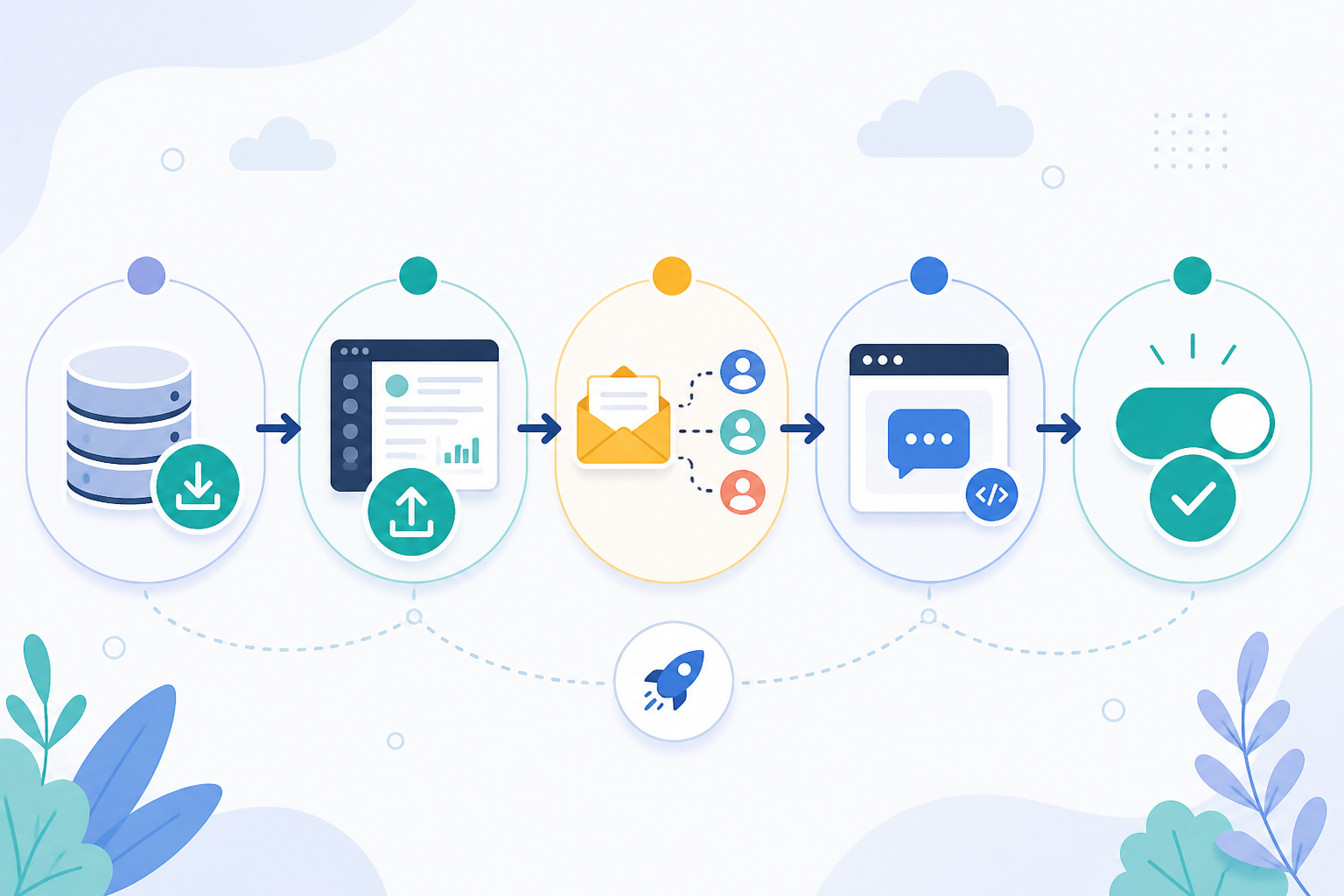 Text equivalent: The migration flows in order: export data from Zendesk, run a small test import, complete the full data import, set up email forwarding and DNS changes, reinstall the live chat widget, run both systems in parallel, then complete the final cutover once you're confident everything transferred correctly.
A smart approach many teams use is a phased rollout. Migrate a controlled group of tickets first, compare first-response time, resolution time and CSAT against the old system, then move full departments over once you're confident everything is working as expected.
Zendesk Migration Checklist Before You Switch Help Desk Software
Before you pull the trigger, run through this list. It can save you from the classic “we forgot about that” moment three weeks into your new tool.
- Confirm your must-have features are covered. Internal notes, tagging, filtering and reporting should work the way your team actually uses them, not just in theory.
- Test the trial with real support scenarios, not just a demo login. Ask the vendor about the trial length and whether a credit card is required upfront. Confirm the terms on the current pricing page rather than assuming they have not changed.
- Check native app support if your team works from mobile devices or Mac computers regularly. Verify this yourself rather than relying solely on marketing copy.
- Verify uptime SLA and reliability commitments. Ask for the current SLA in writing and confirm what compensation, if any, applies if it is not met.
- Review data protection and residency terms. For UK and EU teams, ask about the vendor's DPA, where data is stored and processed, GDPR compliance and its subprocessor list before signing anything.
- Check backup and export capability. Make sure you can get your data back out if you ever need to switch again.
- Loop your team in early. Nobody likes discovering that their daily tool has changed overnight without warning.
- Set a firm cutover date. Running two systems indefinitely is how migrations quietly stall and never actually finish.
Frequently Asked Questions About Zendesk Alternatives
What Are Good Zendesk Alternatives for Small Teams?
Small teams usually want help desk software that is simpler and cheaper than Zendesk without losing core customer support features. Look for a tool with a shared inbox, live chat widget and email ticketing, and pay close attention to whether pricing is per-agent or flat-rate. That single factor often matters more than any individual feature.
Sonny, for example, offers unlimited agents for one flat monthly price. This can suit teams that do not want to ration access to the support inbox. Test whether it covers your specific integration, reporting and workflow needs before switching.
Can I Migrate My Ticket History to a New Help Desk Tool?
Yes. Most help desk software supports importing exported ticket data, although the process and the data that transfers vary by provider. Zendesk allows you to export your data, and many customer support software tools can import core ticket content. Macros, triggers, automations and certain custom fields may not transfer automatically.
Ask any vendor you're evaluating exactly what its import process supports before committing. Always run a small test import before migrating your entire archive.
Is Flat-Rate Pricing Better Than Zendesk's Per-Agent Model?
It depends on your team size, growth pattern and reliance on Zendesk-specific features. If you have more than a handful of agents or your team fluctuates seasonally, flat-rate pricing can save money and remove the awkward decision about who gets a seat.
Per-agent pricing may still make sense for very small, stable teams that rarely add people or need Zendesk's deeper enterprise features. For many growing SaaS and e-commerce support teams without complex enterprise routing needs, flat-rate pricing is more predictable and cost-effective. Run your own comparison using your actual headcount, monthly rate and growth plans.
What to Do Next
Switching help desk software is not about choosing the cheapest option for its own sake. It's about making sure your support tool fits how your team actually works without financially penalising you every time you grow.
For a quick comparison, take your current Zendesk agent count, multiply it by your per-agent monthly rate and compare the result with a flat-rate tool's monthly fee. If the gap makes you wince, it's probably worth running a trial.
Set yourself a simple two-week test. Track first-response time, resolution time, CSAT and how completely your ticket history imported. Then compare those numbers honestly against your current setup before making the switch permanent.
If Zendesk's per-agent pricing has you rationing seats instead of empowering your whole team, it may be time to see what your support operation looks like with predictable, unlimited-agent customer support software.