
How Startups Can Skip Onboarding Calls When Choosing Customer Support Software
You don't always need an onboarding call to successfully implement customer support software. In many cases, what you actually need is good documentation, an intuitive interface, and a product built for self-serve setup from day one. If a tool requires a 30-minute call just to send your first reply, that's worth questioning, though it isn't automatically a red flag. Sometimes it means the product is genuinely complex, sensitive, or built for a different kind of buyer than you. But for a lot of small and growing teams shopping for help desk software, the best options should let you go from signup to your first customer conversation in well under an hour, with minimal hand-holding.
I know that might sound like a bold claim, especially if you've spent years assuming that "proper" software implementation means a calendar invite, a rep sharing their screen, and a follow-up email with next steps. That ritual has a real history, and it's still the right call for some products. But it's worth understanding why it exists, so you can tell when it's genuinely necessary and when it's just how a company has chosen to sell.
Why do onboarding calls exist in the first place?
Onboarding calls have a legitimate history, mostly in enterprise software. A single implementation might touch five departments, sync with a dozen legacy systems, and require sign-off from IT, legal, and finance before anyone even logs in. In that world, a human walking you through setup can genuinely save time and prevent costly mistakes, especially where security review, custom permissions, or data migration are involved.
But that model doesn't map cleanly onto every tool it's applied to. If you're a ten-person SaaS company or a small e-commerce brand, you probably don't have competing departments fighting over how your shared inbox should work. You mostly just need to start replying to customers.
So when a fairly straightforward tool, say a live chat widget or basic email ticketing system, insists on a call before you can use it at all, it's worth asking why. Sometimes there's a good reason: perhaps it integrates deeply with your CRM, needs single sign-on configured, or has to meet specific compliance requirements. But sometimes the reasons are less about the product and more about the sales model:
- The interface wasn't designed with first-time users in mind, so a human has to compensate for confusing UX
- Sales-led onboarding helps justify higher per-seat pricing by making the product feel more "white glove"
- The company wants a chance to qualify you, or upsell you, before you've even seen the dashboard
The useful distinction here isn't "calls are bad." It's whether the call is covering genuine technical complexity or standing in for a product that could otherwise be understood on your own. A shared inbox that unifies live chat, email, and team notes should usually be something you can figure out yourself, roughly the way you'd figure out a new note-taking app. If it's not, and there's no security, compliance, or integration reason for that, that tells you something about the product, not about your team's capability.
What good self-serve onboarding actually looks like
So what should happen instead, for customer support tools that don't need heavy configuration? I like to think of it as a five-step journey that usually takes minutes, not meetings. Here's what a well-designed setup flow tends to look like for straightforward customer support software:
- Sign up instantly, ideally without a credit card. You should be exploring the actual product shortly after hitting "start free trial," not filling out a lead form that routes you into a sales queue.
- Connect your email in a few clicks. Good email ticketing setup usually means your support inbox forwards automatically, converting emails into trackable tickets without much manual configuration. It's still worth double-checking authentication settings, like SPF and DKIM, so mail actually lands where it should.
- Add your live chat widget. For most small teams, this should be a simple copy-and-paste snippet you can hand to whoever manages your website. Larger sites with custom permissions or multiple properties may still need a bit of developer input.
- Invite your team and check permissions. If the platform uses flat-rate pricing with unlimited agents, adding people is easy. Either way, it's worth confirming role-based permissions work the way you expect before you rely on them.
- Start organising conversations, then test before going live. Tagging, filtering, and basic collaboration features should be usable in your first session. Before you point real customers at it, send a few test messages to confirm routing, notifications, and assignment rules behave as expected.
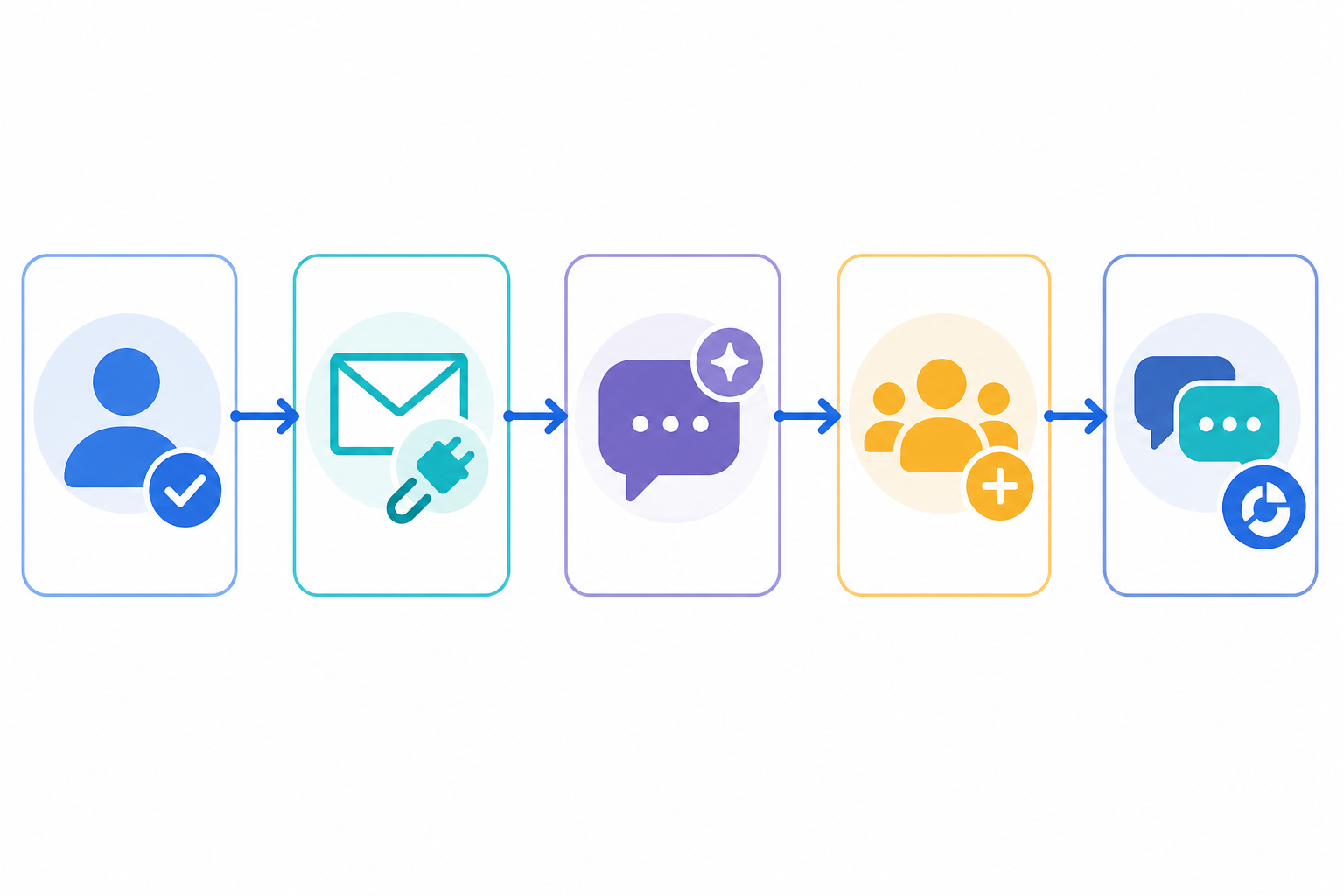
When I helped a small team set up their support tool this way, that's genuinely what it felt like: sign up, connect the inbox, drop in the chat widget, invite the team, run a couple of test tickets. Done in an afternoon, not spread across a week of calendar invites. That won't be everyone's experience, particularly if your setup involves more moving parts, but for a lot of small teams it's a realistic benchmark.
Can documentation actually replace a human onboarding call?
Here's the part that often gets overlooked: self-serve setup doesn't mean you're left to figure everything out alone. It means support comes in a different form, one that works on your schedule rather than a rep's calendar.
Good documentation and in-app guidance can replace much of what a human onboarding call would cover, particularly for day-to-day setup tasks. Look for:
- Clear, searchable help centre articles that cover setup, permissions, and troubleshooting, not just marketing-friendly feature tours. If you're wondering how to configure internal notes, reporting, or escalation paths, the answer should be findable without a support ticket.
- Documentation on integrations, APIs, and data handling. If you'll eventually need to connect a CRM, migrate historical tickets, or understand where data is hosted, this should be written down clearly, not something you only learn by asking.
- Short video walkthroughs for visual tasks like widget customisation, where a 90-second clip can beat several paragraphs of text.
- In-app tooltips and empty states that guide you the moment you land on a blank screen, rather than leaving you guessing.
Beyond core documentation, a couple of newer features are worth mentioning as helpful extras, even though they're not strictly essential:
- AI-powered copilot features trained on your own documentation can be genuinely useful for getting quick, contextual answers instead of digging through articles.
- Native apps that broadly mirror the browser experience make switching between desktop and mobile less jarring, though it's fine if mobile apps are slightly lighter on features.
This documentation-first approach respects your time, but it's not a substitute for genuine technical support when something goes wrong. It's worth checking what human support options exist alongside the self-serve material, including support hours relevant to UK time zones if that matters for your team.
What are the red flags that a tool actually needs a call?
To be fair, some tools genuinely do need a conversation before you can use them well. The useful skill is telling apart three things that often get lumped together: genuine technical complexity, a sales qualification process, and optional implementation support you can choose to skip.
Legitimate reasons for an assisted setup include single sign-on and role-based permission configuration, integration with existing CRM or ERP systems, historical data migration, multi-brand or multilingual setups, high-volume ticket routing rules, and compliance requirements such as GDPR data handling or sector-specific regulations. None of these make a product bad. They just mean it's solving a more complex problem than a five-person team's shared inbox.
Sales-led gatekeeping, by contrast, is when basic functionality, not configuration, is locked behind a call. Here's a rough comparison:
| Signal | Self-Serve Software | Sales-Led Gatekeeping | Legitimate Assisted Implementation |
|---|---|---|---|
| Pricing page | Listed clearly | "Contact sales for pricing" | May list pricing tiers, with implementation quoted separately |
| Free trial | Instant access | Requires a scheduled demo first | Trial available, with optional paid onboarding for complex setups |
| Core features | Usable without a tutorial | Need training for basic tasks | Basic features usable alone; advanced integrations need guidance |
| Documentation | Detailed, searchable, current | Vague, outdated, or missing | Detailed, plus dedicated integration/security docs |
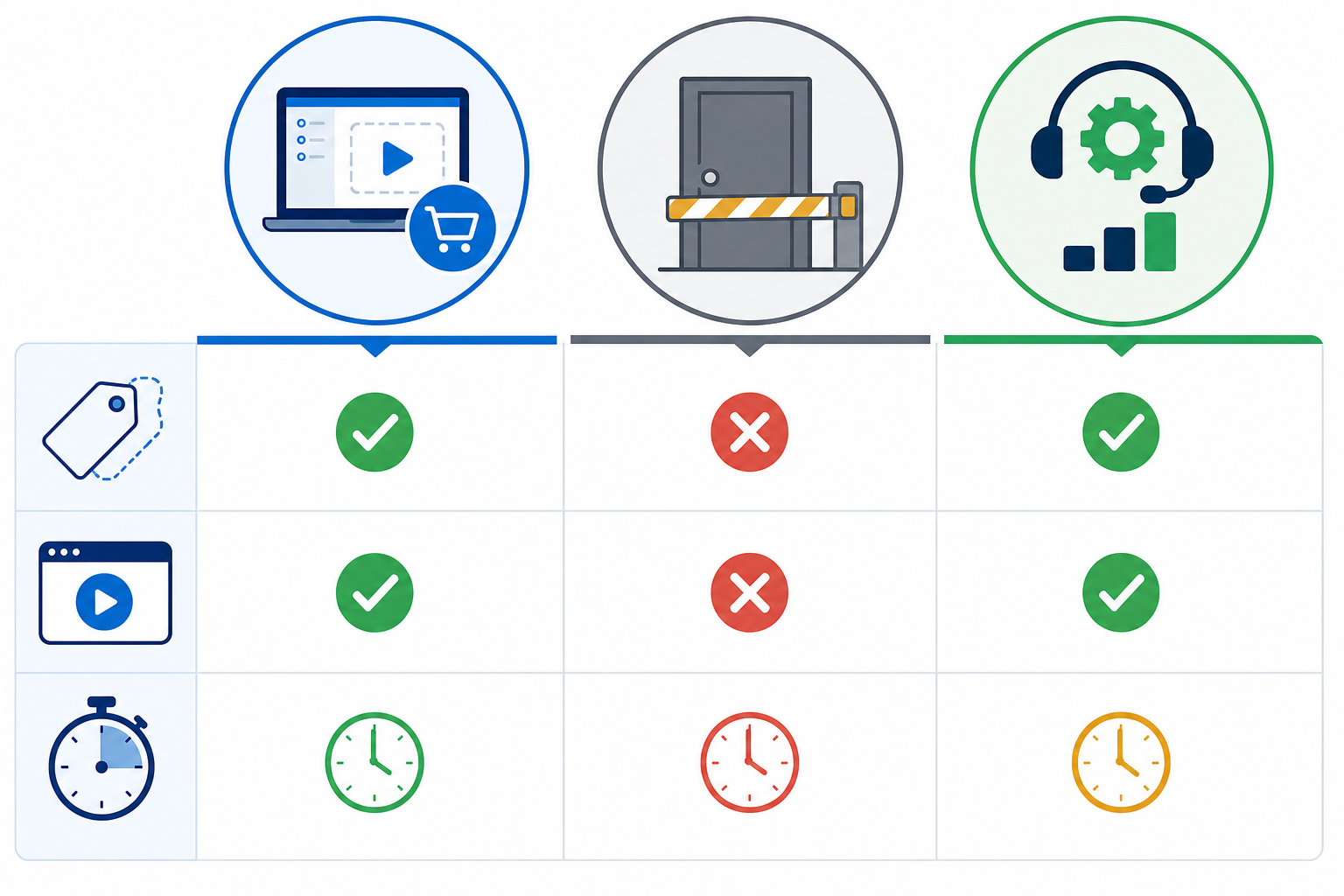
If a tool hides pricing, gates its trial, and buries documentation, with no genuine complexity to justify it, that's a reasonable signal about how it's designed to be sold. It often previews how it'll feel to use day to day. But if the friction lines up with real integration, security, or compliance needs, that's a different and often reasonable story.
How to evaluate help desk software setup speed before you buy
Before committing to any help desk software, it's worth running your own small test. This takes perhaps 30 minutes, and it tells you more than any sales deck will.
- Start the free trial yourself and time the basics. From signup to sending your first message or ticket, assigning it to a teammate, and adding a colleague, how long does it take? A reasonable benchmark is completing all of that within 15–30 minutes, assuming no complex integrations are involved.
- Check the agent pricing structure. Does adding a new team member trigger extra cost, or is it included? Compare the total cost at your current size and at roughly double that size, so you're comparing real totals rather than headline price.
- Test permissions and notifications, not just the happy path. Add a second user with limited permissions and confirm they see what they should, and nothing more. Check that ticket notifications actually arrive where expected.
- Test it on mobile, not just desktop. Tools that look polished in a browser demo sometimes fall apart on a phone. If your team needs mobile access, check it directly rather than assuming parity.
- Look at data export and deletion options. Before you commit, confirm you can get your data out if you switch tools later, and understand how data deletion and hosting location are handled, relevant for UK and EU data protection obligations.
- Read reviews that mention setup time specifically. Comments like "we were up and running in an afternoon" or "took our team weeks to configure" tell you what real customers experienced, not just what the marketing promises.
Doing this before you buy helps you avoid committing to a tool because a demo looked slick, only to discover weeks later that day-to-day use (or getting your data out) is a slog.
Is flat-rate, self-serve pricing right for your startup?
Every sales call, every "let's schedule a follow-up," and every week spent in implementation is time your team isn't spending on customers or product. For many small teams, speed of setup is a genuine competitive advantage, not just a convenience.
This is part of why flat-rate pricing with unlimited agents appeals to a lot of growing teams. Per-seat pricing means costs rise directly with headcount, even when the software itself hasn't changed. That's worth factoring into your total cost of ownership as you plan for growth, alongside VAT treatment if you're comparing UK-listed prices. A flat monthly fee, by contrast, can remove that scaling cost, letting your whole team use the shared inbox, live chat widget, and email ticketing tools without anyone doing mental maths about whether one more agent is "worth it."
That said, flat-rate self-serve tools aren't automatically the better choice for every team. Per-seat, sales-led products sometimes include deeper reporting, more granular permissions, dedicated account management, or contractual SLAs that matter for larger or more regulated organisations. The right comparison isn't "cheaper is better"; it's matching the pricing model and feature depth to what your team actually needs now and over the next year or two.
For small teams that mainly need a shared inbox, tagging and filtering, decent response-time reporting, and straightforward team collaboration, self-serve flat-rate tools are often a strong fit precisely because they avoid paying for enterprise complexity you won't use. For teams with more complex integration, compliance, or reporting needs, it's worth weighing that added depth against the slower, sales-led path that often comes with it.
There's also a longer-term habit worth building here: evaluating tools based on how they actually feel to use during a trial, rather than how convincing the sales pitch sounds, pays off well beyond your support stack. Once you know what a genuinely fast, well-documented setup feels like, it becomes much easier to spot when complexity is real versus when it's just how a product has chosen to sell itself.
Frequently asked questions about customer support software onboarding
Do I really need an onboarding call to use new customer support software? Usually not, if you're a small or mid-sized team with straightforward needs, like a shared inbox, basic ticketing, and a chat widget. You're more likely to need a call if you're integrating with existing systems, migrating significant historical data, configuring single sign-on, or working within specific compliance requirements like GDPR. In those cases, a call can genuinely save you time rather than gatekeep the product.
How can I tell if a support tool is truly self-serve? Try the free trial yourself before committing, and time the basics: signing up, connecting email, adding a teammate with limited permissions, and sending a test message. If you can do all of that within about 30 minutes without contacting sales, that's a strong sign the product is built for self-serve setup. If core functionality, not just advanced configuration, is locked behind a call, that's a different signal.
What makes self-serve onboarding successful for a growing startup? A combination of an intuitive interface and genuinely useful documentation: setup guides, troubleshooting articles, and clear information on integrations and data handling, not just marketing-friendly feature tours. AI copilot tools and native mobile apps can help too, but they're enhancements on top of solid documentation, not substitutes for it.
Are onboarding calls always a sign that a product is too complex? Not always. A mandatory call before you can see basic pricing or use core features is worth questioning. But a call tied to specific technical needs, like SSO setup, CRM integration, data migration, or compliance review, often reflects genuine complexity rather than an artificial sales barrier. The distinction is whether the call is unlocking real configuration work or simply standing between you and a product you could otherwise use on your own.