

How to Reduce "Where Is My Order?" Support Tickets in E-commerce
The fastest way to reduce "Where is my order?" tickets is to stop treating them as one big pile. Split them into three types (normal transit, delayed and lost), then give each its own proactive update, reply template and tag. You'll likely prevent a fair share of contacts, and the ones that remain become measurable. A live chat widget and a shared inbox keep the remaining answers quick, so your whole team can handle them, not just the one person who knows where everything lives.
That's the short version. Let's walk through how to actually do it. ☕
Why "Where is my order?" tickets dominate e-commerce support inboxes
Picture this. It's the Tuesday after a bank holiday weekend, you open your inbox with a cup of tea, and there are 47 new emails. Forty of them say some version of "Where's my parcel?" You haven't even had a chance to look at the tricky stuff, like the damaged item or the wholesale enquiry, because you're copying and pasting tracking links.
If that's you, take a breath. This is completely normal, and it doesn't mean you're doing something wrong.
Where-is-my-order (WISMO) questions come from uncertainty. A customer has paid you, heard nothing, and can't tell whether the order is packed, dispatched, delayed or sitting in a depot. Sending a quick message feels easier than waiting and worrying. In my experience, silence is the biggest trigger.
The usual root causes are pretty predictable:
- No dispatch email, or one that's easy to miss
- Tracking links buried in a footer or hidden behind a confusing button
- Carrier tracking stuck on "label created" for days, which looks like nothing is happening
- Peak-period delays with Royal Mail, Evri, DPD or whoever you ship with
- Split shipments that make a partial delivery look like a missing item
Here's the frustrating bit: these contacts are almost always repetitive and simple. Each one takes a minute or two, but together they eat the time you need for harder conversations. So the real goal is to reduce these tickets before they happen, and to handle the leftovers in an organised way. Answering faster is a bonus.
Split order-status tickets into three types
WISMO feels overwhelming because every ticket looks the same in the inbox. "Where's my order?" could mean "I'm a bit impatient" or "my parcel has vanished." You can't fix what you can't separate, so we start by sorting.
- Type 1, normal transit: the parcel is moving as expected. The customer just wants reassurance or a link.
- Type 2, delayed: the parcel is past its estimated delivery date, or it's stuck without scans, but it's still likely to arrive.
- Type 3, lost or failed: the parcel is marked delivered but not received, has been returned to sender, or has had no movement for a set number of days.
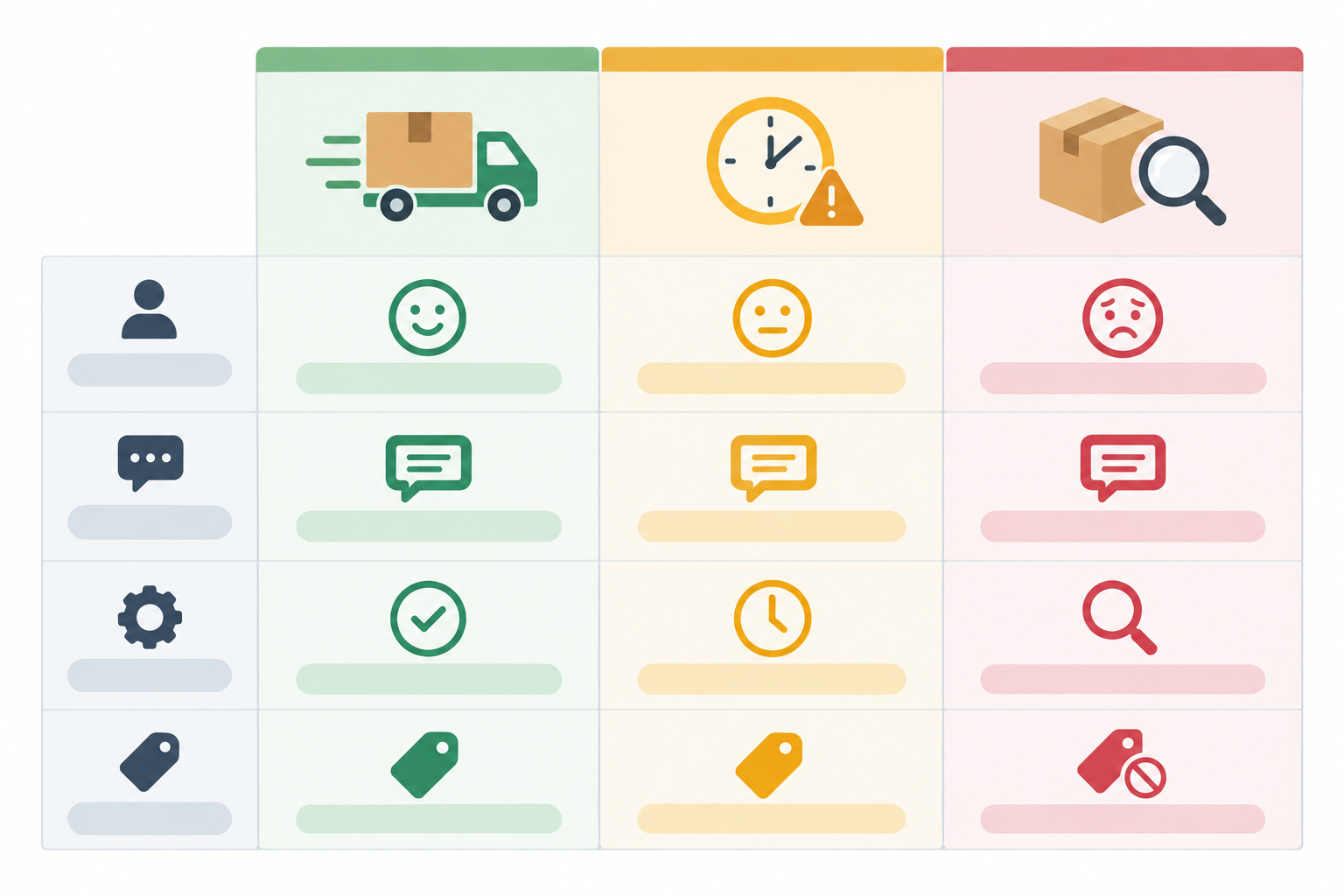
Here's how each type of "Where is my order?" ticket looks side by side:
| Normal transit | Delayed | Lost or failed | |
|---|---|---|---|
| Customer's mindset | Curious, mildly anxious | Frustrated, wondering if you're on it | Worried, possibly annoyed |
| Response speed | Same day is fine | As soon as you spot it, ideally first | Fastest priority |
| Best action | Send latest scan and tracking link | Acknowledge, chase the carrier, give a next-update date | Apologise, then reship or refund |
| Suggested tag | wismo-transit | wismo-delayed | wismo-lost |
When does a delayed parcel become lost?
You'll want a simple rule so nobody has to guess. For example: "If there's been no scan for five working days, treat it as lost and start a trace or replacement." The right number depends on your carriers and services, since a tracked 48-hour service behaves very differently from an economy international one. Pick a threshold, write it down, and tweak it once you've seen a few months of data.
Proactive updates that prevent "Where is my order?" contacts
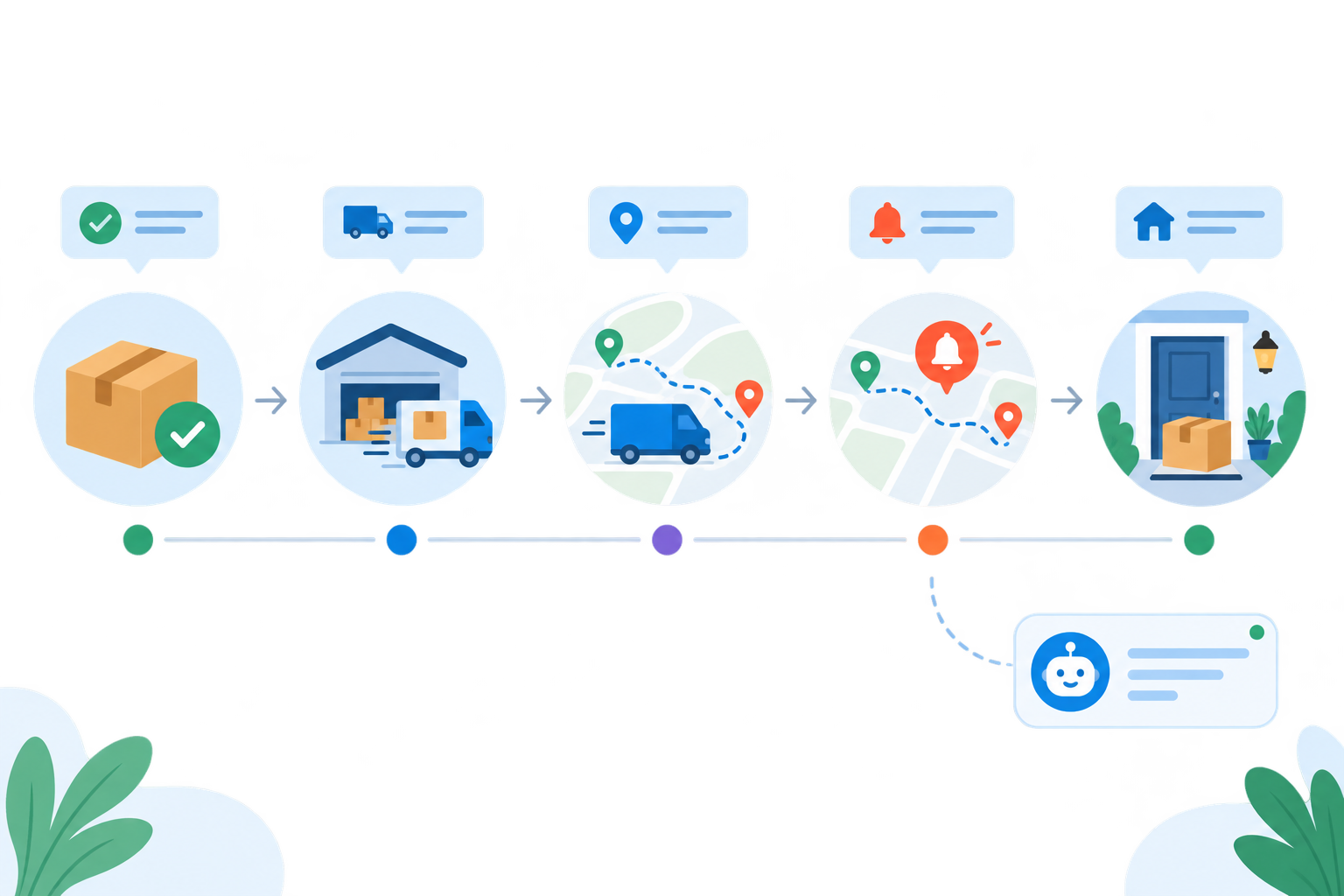
The cheapest ticket is the one that never gets sent. Here's what to put in place, roughly in the order a customer experiences it.
- An honest order confirmation. Give delivery expectations in working days, and mention known carrier delays if there are any. Under-promising and over-delivering beats the reverse every time.
- A dispatch email with the tracking link near the top, not in the footer. Make it branded and hard to miss.
- A self-serve tracking page. Link to it from your site so customers can check status without writing in. Show carrier scans in plain language and explain what to do if a delivery is late.
- A "running late" message the moment you spot a delay. Don't wait for customers to ask.
- Replies that reach you. Make sure responses to these emails land in your shared inbox, so a real person sees them rather than a no-reply address swallowing the question.
Here's a quick, illustrative example (not a statistic). Imagine a small candle shop whose dispatch email had the tracking link in a tiny line at the bottom. They move it to a big button right under the greeting. It's easy to see why that could cut "can you send me my tracking?" emails: the answer is now exactly where the customer looks first.
One gentle caution: don't send a message for every minor carrier scan. Too many notifications create their own noise. Stick to the moments that matter: confirmed, dispatched, out for delivery, delayed and delivered.
How to answer each type of order-status ticket
Even with great proactive updates, some people will still write in. That's fine. Here's a repeatable way to handle them.
- Identify the type. Check the tracking status and the order date. Be careful with "label created", because it doesn't necessarily mean the carrier has the parcel yet. Explain the difference rather than just resending a link.
- Normal transit: reply with the latest scan, the expected delivery window and the tracking link. Keep it short and friendly.
- Delayed: acknowledge the delay, say what you're doing (for example, chasing the carrier), and give a specific date for your next check-in. Avoid promising an arrival date the carrier hasn't confirmed.
- Lost or failed: apologise plainly, offer a clear remedy (reship or refund), and keep the customer's effort to a minimum. They shouldn't have to prove anything twice.
- Apply the right tag so the ticket is counted in the correct bucket.
A note on UK rules for late or undelivered orders
This is general information, not legal advice. In the UK, the Consumer Rights Act 2015 sets out customers' rights around late or undelivered goods. Broadly, unless you've agreed a different date, goods should arrive within 30 days. The goods generally remain the seller's responsibility until the customer, or someone they've nominated (other than the carrier), takes possession. There's an exception if the customer arranged their own carrier and you didn't offer that carrier as an option. Details vary by situation, so check current guidance from GOV.UK or Citizens Advice, or take proper advice, before you write a firm policy. One thing to avoid is treating a carrier's "delivered" scan as proof the customer has the parcel.
Use internal notes to save your team time
When you open a carrier claim, jot the reference number in an internal note on the ticket. If a teammate picks up the conversation next week, they can see exactly what's happened without asking the customer to repeat themselves. This is where a shared inbox quietly earns its keep.
Reply templates for delayed and lost packages
Templates are your best friend here. Write them once, save them as canned replies, and personalise the first line so nothing feels robotic. Here are three to adapt.
Delayed package
Hi [Name], thanks for getting in touch, and I'm sorry your parcel is running behind. The latest carrier scan shows [status/location] on [date]. I'm chasing this with [carrier] today, and I'll update you by [specific date], even if there's nothing new. If it hasn't moved by then, we'll sort out a replacement or refund for you.
Lost package
Hi [Name], I'm really sorry, it looks like your parcel hasn't made it to you. I'd like to put this right straight away. I can either send a replacement today or refund you in full, whichever you'd prefer. Just reply with your choice and I'll take care of the rest. You don't need to do anything else.
Marked delivered but not received
Hi [Name], thanks for letting us know. The carrier shows this as delivered on [date/time] to [location, if available]. It's worth checking with neighbours, anyone else at your address, and any safe places or porches. If it's still missing after that, reply here and I'll open an investigation with the carrier and talk you through the next steps.
Tips for a helpful, human tone
- Don't blame the carrier. To the customer, you're the one who sold them the thing.
- Skip the jargon. "Exception" and "manifest" mean nothing to most people, so translate them.
- Keep the customer in control by offering clear options and telling them what happens next.
- Always give a date for your next update. It's one of the best ways to stop follow-up emails.
A practical bonus: if your shared inbox has no per-seat charges, everyone on the team can use the same templates without extra licence costs. That matters in peak season, when you borrow a partner, a friend or a temp for a few weeks.
Can a live chat widget provide instant order-status answers?
Can live chat reduce order-status emails? It can. When someone is staring at a stalled tracking page, a quick reply can stop them writing an email and then a follow-up. How quick depends on your staffing, opening hours and how you've configured chat, so set expectations honestly.
Placement matters. A live chat widget on your order confirmation page, tracking page and help page catches questions at the exact moment of worry. Someone looking at a stalled tracking page is more likely to click "chat" than hunt for your email address.
A few things I'd suggest:
- Use AI carefully. If you use an AI copilot, have it answer only from approved, current information such as your shipping policy and FAQs. It shouldn't guess at shipment details, and delayed, lost or account-specific cases should go straight to a person. Review its answers regularly.
- Keep everything in one place. When chat and email live in the same shared inbox, the full conversation history is there whichever channel the customer used. Nobody has to say "as I mentioned in my email."
- Go mobile. If your tool has mobile apps, someone can answer a quick status question away from their desk.
- Keep a non-chat route. Some customers can't or won't use chat, so always offer an email option too.
I'll be honest: chat works best alongside proactive updates, not instead of them. Think of it as the safety net rather than the main act.
Track WISMO ticket volume with tags and reports
This is where the three-type split really pays off. Once tickets are tagged, you stop guessing and start seeing.
- Create three tags: wismo-transit, wismo-delayed and wismo-lost. Add an optional carrier tag (like carrier-evri) if you use several.
- Tag every order-status ticket when you reply. It takes five seconds, but it has to become a team habit. Inconsistent tagging is the quickest way to make your numbers misleading.
- Filter by tag weekly to see the proportion of each type and which carriers cause the most trouble.
- Check your response-time and team-performance reports to confirm status tickets are being answered promptly.
- Change one thing at a time (a new dispatch email, say), then compare tag rates before and after.
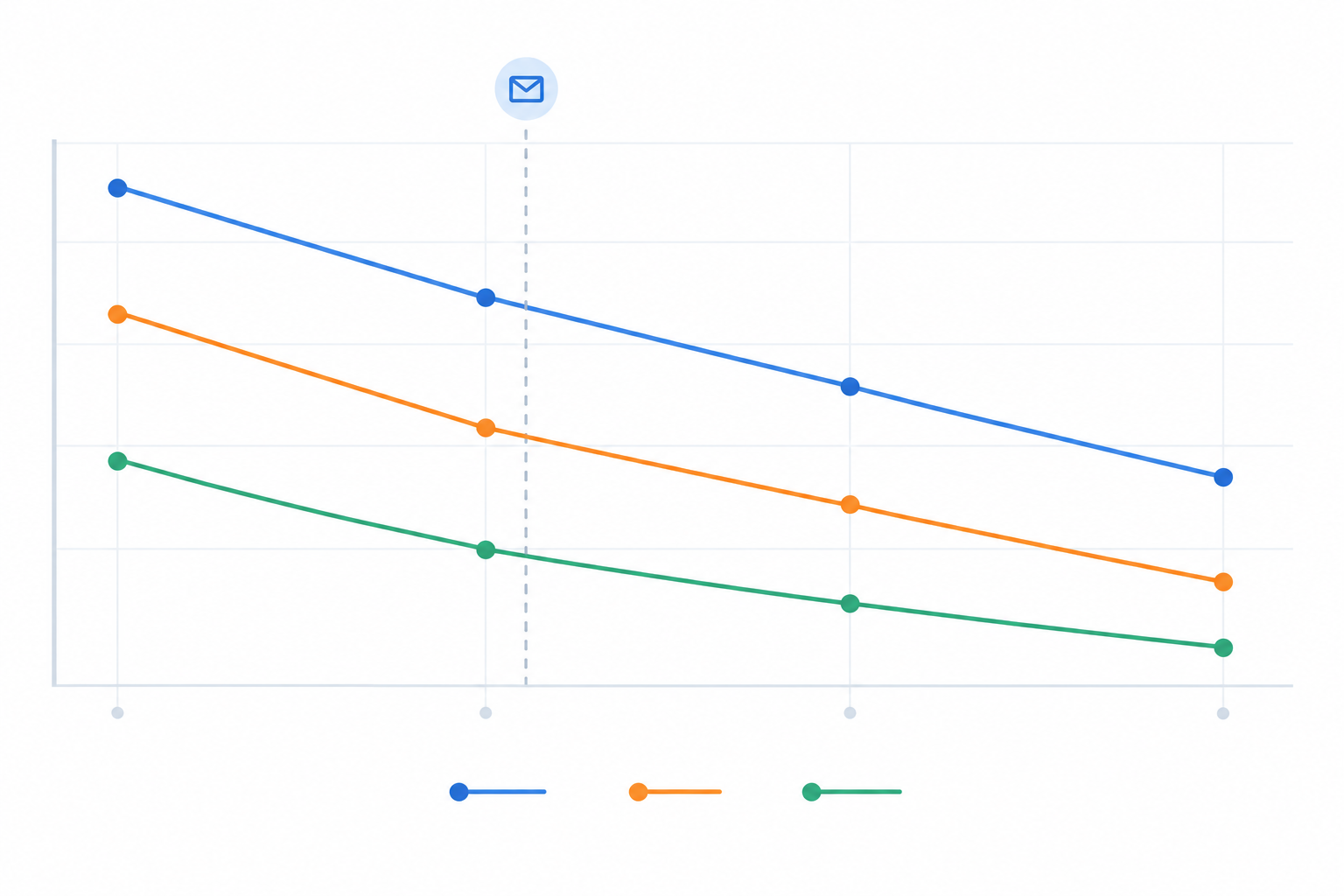
The chart above is an illustrative example only, not real results. In your own reports, show tickets per 100 orders rather than raw counts, so busy and quiet weeks can be compared fairly.
What does good look like?
Trends are prompts to investigate, not proof of cause. Order mix, carrier performance and seasonality all move the numbers too.
- Fewer transit tickets suggests your proactive updates and tracking links are doing their job.
- Fewer delayed tickets may reflect better carrier choices or clearer expectation-setting. Check carrier performance data alongside.
- Fewer lost tickets is a good sign, but look at carrier, address and fulfilment data before deciding why. Packaging or address checks might be the cause, or it might be something else entirely.
Track WISMO tickets as a share of orders (for example, per 100 orders) rather than raw counts. If your sales double and your tickets stay flat, that's real progress, but raw numbers would hide it. And keep an eye on customer satisfaction alongside the numbers, so fewer contacts never means a worse experience.
A simple 30-day plan to reduce support tickets
You don't need to do everything at once. Try this.
- Week 1: set up the three tags and save your reply templates in your shared inbox.
- Week 2: rewrite your dispatch email and put a clear tracking link at the top.
- Week 3: add a live chat widget to your order confirmation and tracking pages.
- Week 4: review your tag reports, compare them against week 1, and pick the next fix.
If you'd like a low-risk place to try this, Sonny is customer support software that brings live chat, email ticketing and internal notes into one shared inbox. At the time of writing, it's priced at $19.99 a month flat, with unlimited agents and conversations, and a 7-day free trial that doesn't require a credit card. Most teams can get started in a few minutes, though your own setup time will depend on how much you configure. Pricing and features can change, so check Sonny's current pricing page before you decide.
And remember: you don't need a perfect system, just a clearer one. 💛
Frequently asked questions about "Where is my order?" tickets
Why do customers keep asking where their order is?
Mostly uncertainty. They've paid, can't see progress, and writing to you feels easier than hunting for a tracking link. Clear, proactive updates remove most of that.
What should I say when a package is delayed?
Acknowledge it, share what the tracking shows, say what you're doing about it, and give a specific date for your next update. Offer a remedy if the delay continues, and keep it honest and blame-free.
Can live chat reduce order-status emails?
It can, especially on tracking and confirmation pages, because customers get an answer at the moment they're worried. Speed depends on your staffing and setup, and chat works best alongside proactive notifications.
How do I measure whether my fixes are working?
Tag every order-status ticket as transit, delayed or lost, then compare weekly tickets per 100 orders. Change one thing at a time so you can see which fix moved which number.
Do I need expensive help desk software to do this?
No. A shared inbox with tagging, saved replies, reporting and ideally live chat is enough. Flat-rate tools with unlimited agents, like Sonny, mean you won't pay more when you add seasonal staff.