

How to Prepare Your Help Docs for an AI Support Copilot
A copilot is only as good as the docs it learns from. So before you switch anything on, audit what you have, split content by product or brand, rewrite articles as short, specific answers, and test the copilot against real customer questions. Then keep a simple review loop going so your docs change whenever your product does, and your agents stay in control of every reply.
That's the whole playbook in a paragraph. The rest of this guide walks through it step by step, with a particular eye on teams running several brands out of one shared inbox. Grab a cuppa, because this is more manageable than it sounds. ☕
Why help docs quality drives AI support copilot accuracy
Picture a small team that runs two online shops and a software product. They get excited about AI, switch on a copilot, and within a day a customer asks about returns. The copilot confidently drafts a reply quoting a 60-day refund window. The problem? That policy was retired two years ago, and it's still sitting in an old FAQ page nobody remembered to delete.
The tool wasn't necessarily broken. A copilot drafts replies from your documentation, so if your docs are patchy, contradictory or out of date, those flaws can show up in customer-facing drafts. Only faster, and with more polish.
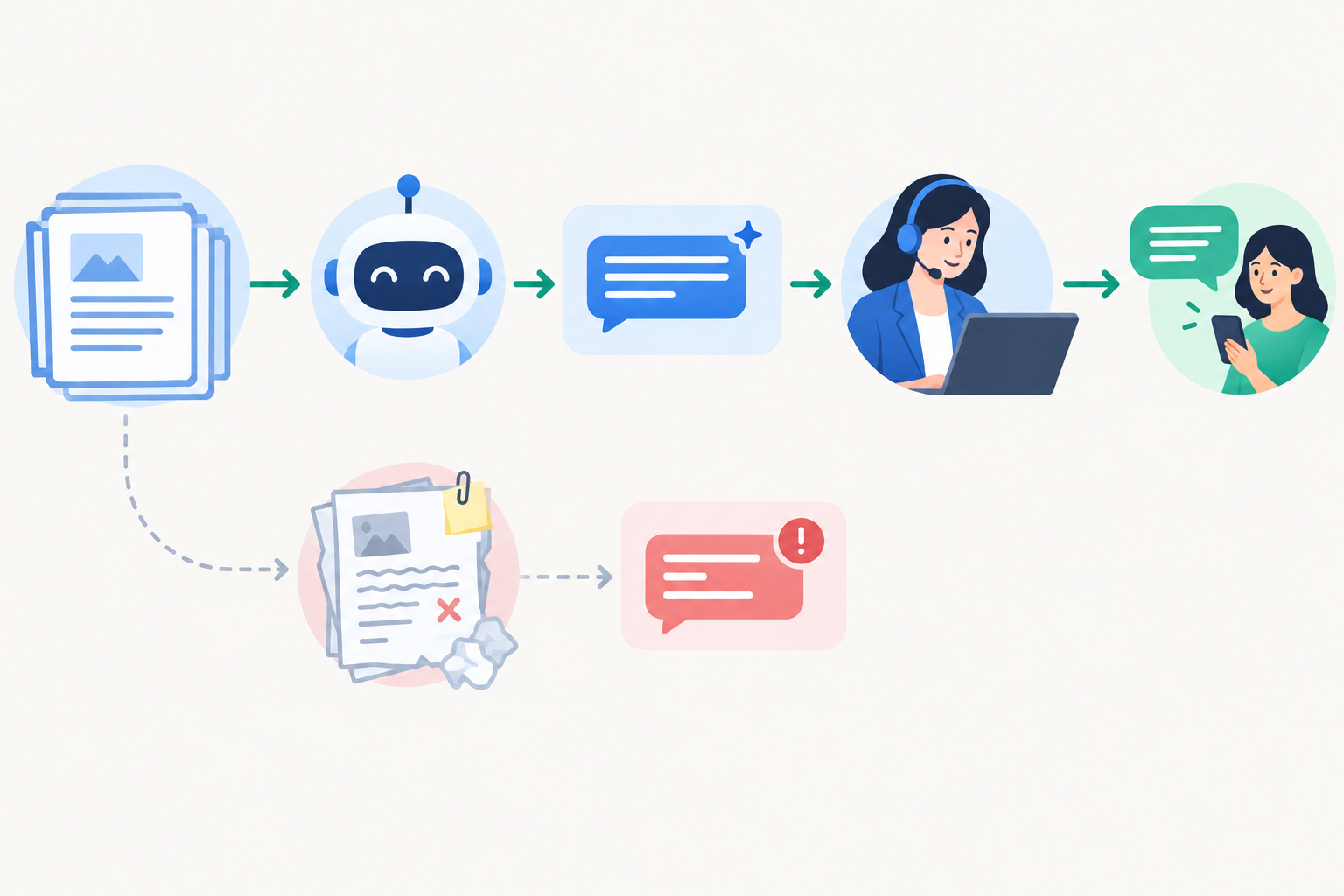
Here's a simplified version of how a copilot works. A customer asks a question. The copilot looks for relevant material in the sources it has been given, then writes a suggested reply based on what it finds. A human agent reviews that draft, edits it if needed, and sends it. The details vary between tools, including how sources are chosen, what permissions apply and what happens when the copilot is unsure. But in every version, the quality of the source material shapes the quality of the draft.
There's a nice bonus too. Prepping your docs helps more than the copilot. Your human agents write better replies, and your self-serve help centre gets better for customers who never contact you at all.
As for effort, in my experience a few focused days of cleanup beat weeks of fixing bad drafts later. I've seen teams skip the prep and then spend their time correcting the same wrong answer again and again.
If you run multiple brands, this matters even more. One wrong product detail looks sloppy, and it can also land in front of the wrong customer entirely. Someone using Brand A gets instructions for Brand B's settings screen, and now you've got a confused customer and a follow-up ticket.
What help docs does an AI support copilot need?
Before auditing, it helps to know what you're looking for. Here's the material a copilot benefits from:
- Core help articles: setup guides, how-tos, troubleshooting steps, and account or billing basics. These cover the bulk of everyday questions.
- Policies: refunds, cancellations, shipping, data and privacy, and service levels.
- Product facts: pricing, plans, limits, and supported integrations and platforms. People ask about these before they buy, and they go stale fastest.
- Tone and escalation guidance: how you sound, what the copilot should never promise (refund guarantees, delivery dates, legal advice), and when to hand off to a human.
- Past resolved conversations and saved replies: these show how real customers phrase things. Just strip out personal data first, such as names, email addresses, order numbers and anything else identifying.
- What to leave out: internal-only notes, draft roadmaps, and anything you wouldn't be comfortable seeing quoted back to a customer. If it would make you wince in a screenshot, it stays out.
That last point deserves a second look. Depending on how your copilot is set up, it may not know which pages are 'for internal eyes only' unless you separate them, so keep that material apart from the start.
A note on UK policy content
If you sell in the UK, your policy pages will probably touch on VAT, consumer rights for returns and refunds, and how you handle data requests under UK GDPR. A help article is customer-facing guidance, not a substitute for legal advice. Before any of this goes into a copilot's sources, make sure it uses your current, approved wording, and have whoever owns policy, legal or compliance review it. Check that your returns wording matches what you actually offer, that VAT statements match how you price, and that data-request instructions match your real process. If you're unsure, ask a qualified adviser rather than guessing.
Step 1: Audit your existing help docs
Now for the unglamorous but useful bit. You need to know what's actually in your documentation before you can trust anything built on top of it.
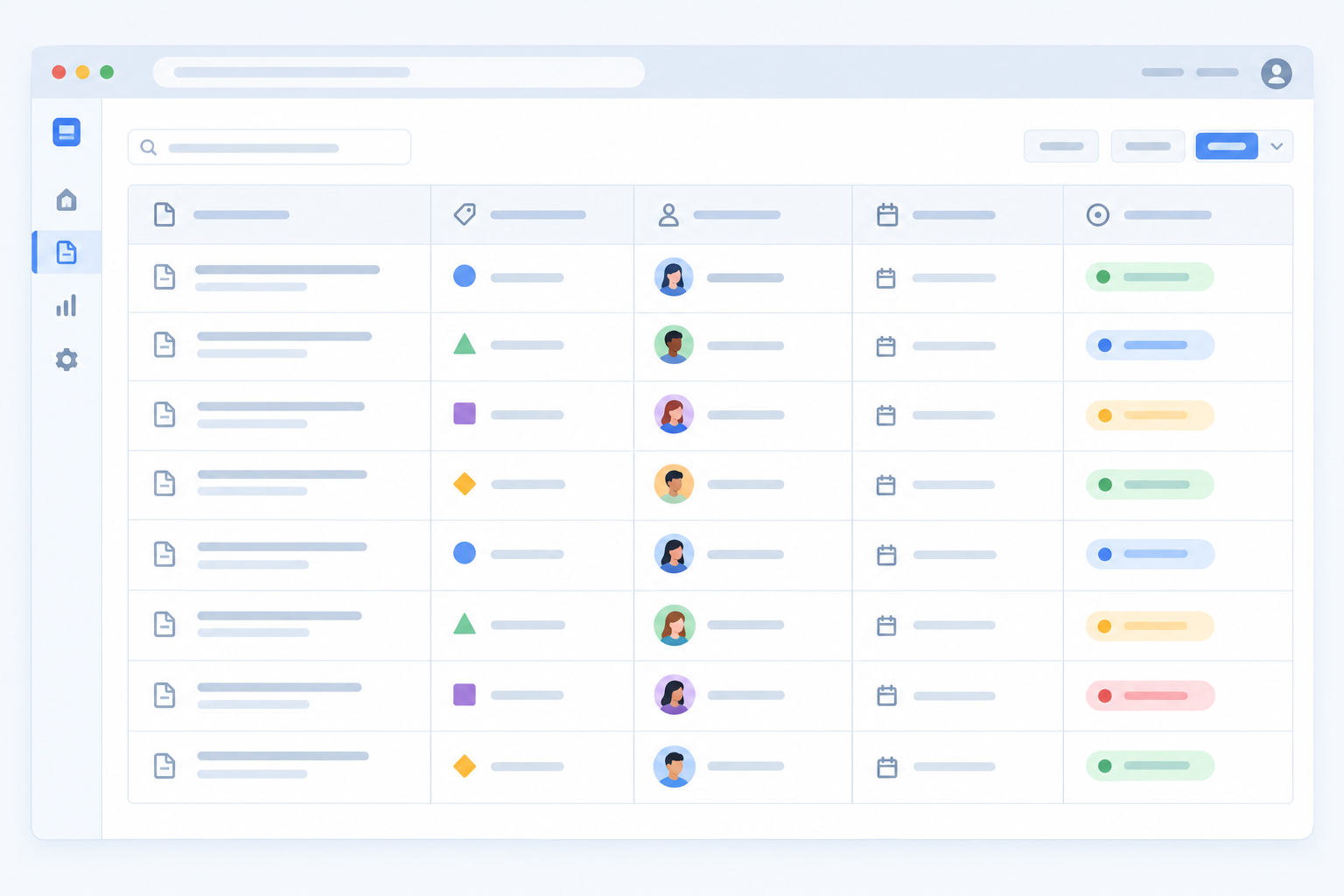
- Put everything in one spreadsheet. List every help article, macro, FAQ, onboarding email and internal wiki page. Yes, everything. You'll be surprised how many saved replies are quietly doing the work of a help article.
- Tag each item. Give every row a product or brand, an owner, a last-updated date, and a status: keep, rewrite, merge or retire.
- Hunt for contradictions. Look for pricing, feature names and policy wording that differ between pages. If one article says 14 days and another says 30, the copilot has no reliable way of knowing which is right.
- Flag the obvious decay. Outdated screenshots, old UI names and dead links all go on the list.
- Check your top 20 questions. Use the tags and filters in your shared inbox to see what customers ask most, then check whether your docs answer each one. Gaps here are your biggest opportunities.
- Prioritise by risk. Fix the high-volume, high-risk topics first: billing, refunds, security. A wrong answer about a bank charge matters more than a wrong answer about dark mode.
A small tip from experience: try not to fix things while you audit. Just record. Fixing as you go can stretch a short job out considerably, and you lose sight of the overall picture.
What an audit finding looks like in practice
Here's a made-up example that shows how one finding travels through the whole process.
The finding: two articles give different return windows for Brand B, one saying 14 days and one saying 30.
The fix: confirm the current policy with the policy owner, merge the articles, retire the old one, and add an 'Applies to: Brand B' line at the top.
The retest: run the same returns question for Brand B again, along with a couple of rephrased versions. Before the fix, the draft might quote the wrong window. After it, you're checking that the draft matches the approved policy.
That's the loop in miniature: spot it, fix the source, test again.
Step 2: Separate help docs by product or brand
If I could only give multi-brand teams one piece of advice, it would be this one. Mixing brands is one of the biggest accuracy risks I see, because shared words mean different things in different products. 'Plan', 'account', 'export', 'workspace': each can describe something quite different depending on which brand you're talking about.
Build a clear structure
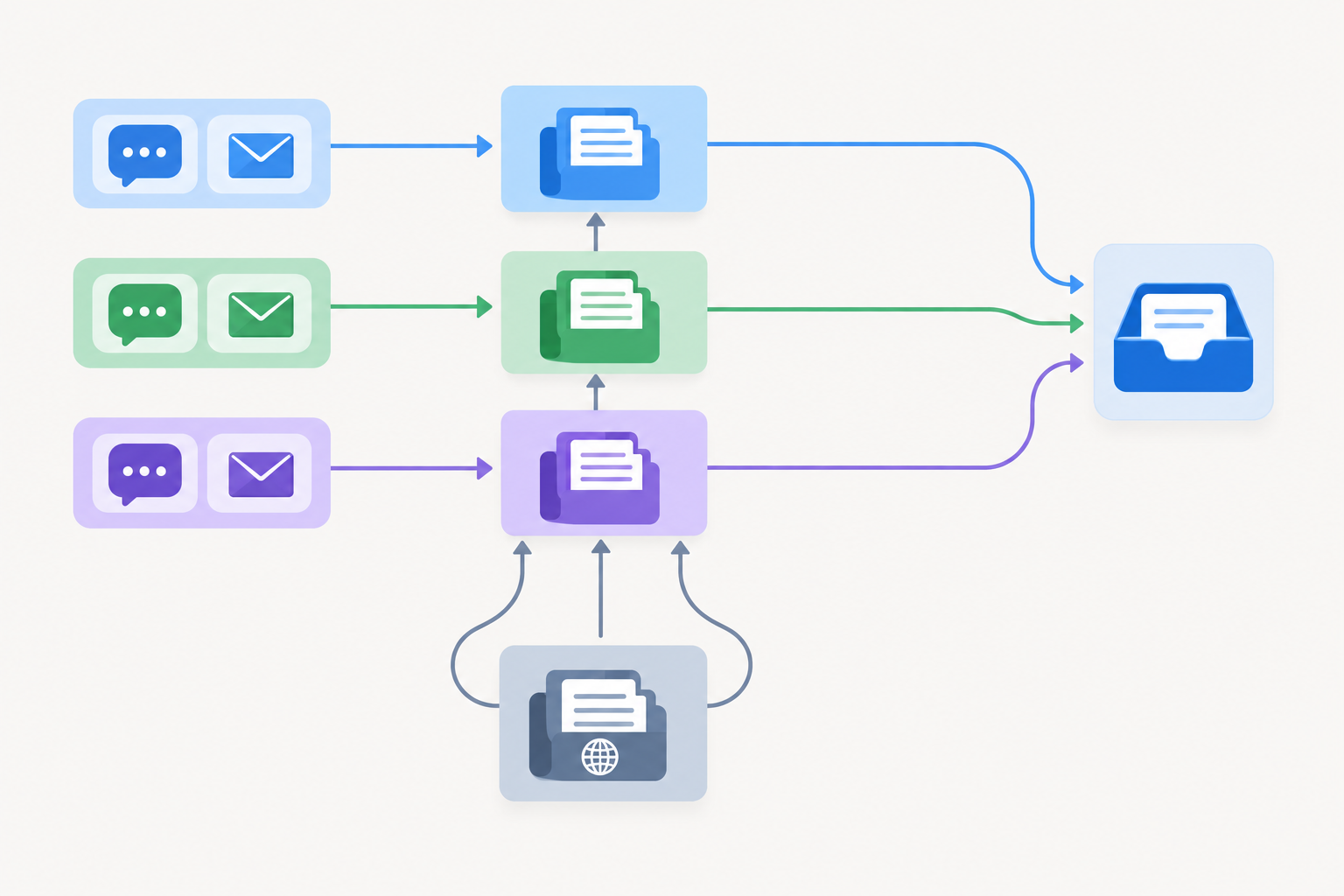
A clean setup is one knowledge collection per brand, plus a small shared collection for company-wide topics like legal pages and company contact details. That way brand-specific content is far less likely to get muddled together.
Name things consistently
Put the product name in article titles, and open each article with a short line stating which product it covers. Something like: 'This article covers exports in BrandName.' It feels repetitive to a human reader, but it's a simple, helpful signal for both people and software.
Mirror your inbox
If each brand has its own live chat widget or email address feeding into your help desk software, try to align your docs to those same brand boundaries. Then the right context is much more likely to follow the right conversation. A message that arrives through Brand A's chat widget should be answered from Brand A's docs. How well this works depends on how your chosen copilot handles sources and routing, so check it rather than assuming. A shared inbox such as Sonny keeps all your brand channels in one place and makes it clear which brand each conversation belongs to, which makes that kind of checking easier.
Handle shared features carefully
Some features really are common to several products. You have two sensible options.
The first is to write it once and reference it. This is usually the safer choice, because there's a single version to maintain. Link to it from each brand's collection, and keep brand-specific differences in separate short notes.
The second is to duplicate it with brand-specific details. This works when the differences are significant, but copies tend to drift apart. If you go this route, name one owner for all versions, link the copies in your audit spreadsheet, and update them together whenever the feature changes.
What you want to avoid is leaving it ambiguous which brand an article applies to.
A quick example
Imagine a fictional company with three brands. Brand A offers 30-day refunds, Brand B offers 14 days, and Brand C is a subscription with no refunds after the first billing cycle. (These are illustrative figures only, so always use your own approved policy wording.) If all three policies sit in one big 'Refunds' article, a copilot could easily blend them into something that applies to none. Separate the docs and add a clear 'this applies to Brand B' line at the top, and a Brand B draft is much more likely to quote 14 days. You'll still want to test routing, permissions and answers in your chosen copilot to confirm it.
Step 3: Write clear help docs with short, direct answers
Good news: what makes docs easier for a copilot also makes them easier for humans. Keep them short, direct and specific.
- Lead with the answer. Put the direct answer in the first one or two sentences, then add the detail underneath.
- One article, one question. Split long catch-all pages into focused pieces. A 3,000-word 'Everything about billing' page is hard for anyone to search.
- Use the words customers use. Title it 'Change my email address', not 'Update account identifier'. Your support conversations will tell you exactly how people phrase things.
- Spell out specifics. Use real numbers, limits, timeframes and exact menu names. 'Within 3 to 5 working days' beats 'a few days', and 'Settings > Billing > Invoices' beats 'in settings'.
- Add 'who this applies to' and 'when this doesn't apply'. Those two lines help cut down edge-case mistakes.
- Use UK conventions. If your customers are in the UK, use UK spelling, day-before-month dates, pounds sterling and familiar terminology throughout.
Here's a quick before and after. The policy below is fictional, so swap in your own approved wording.
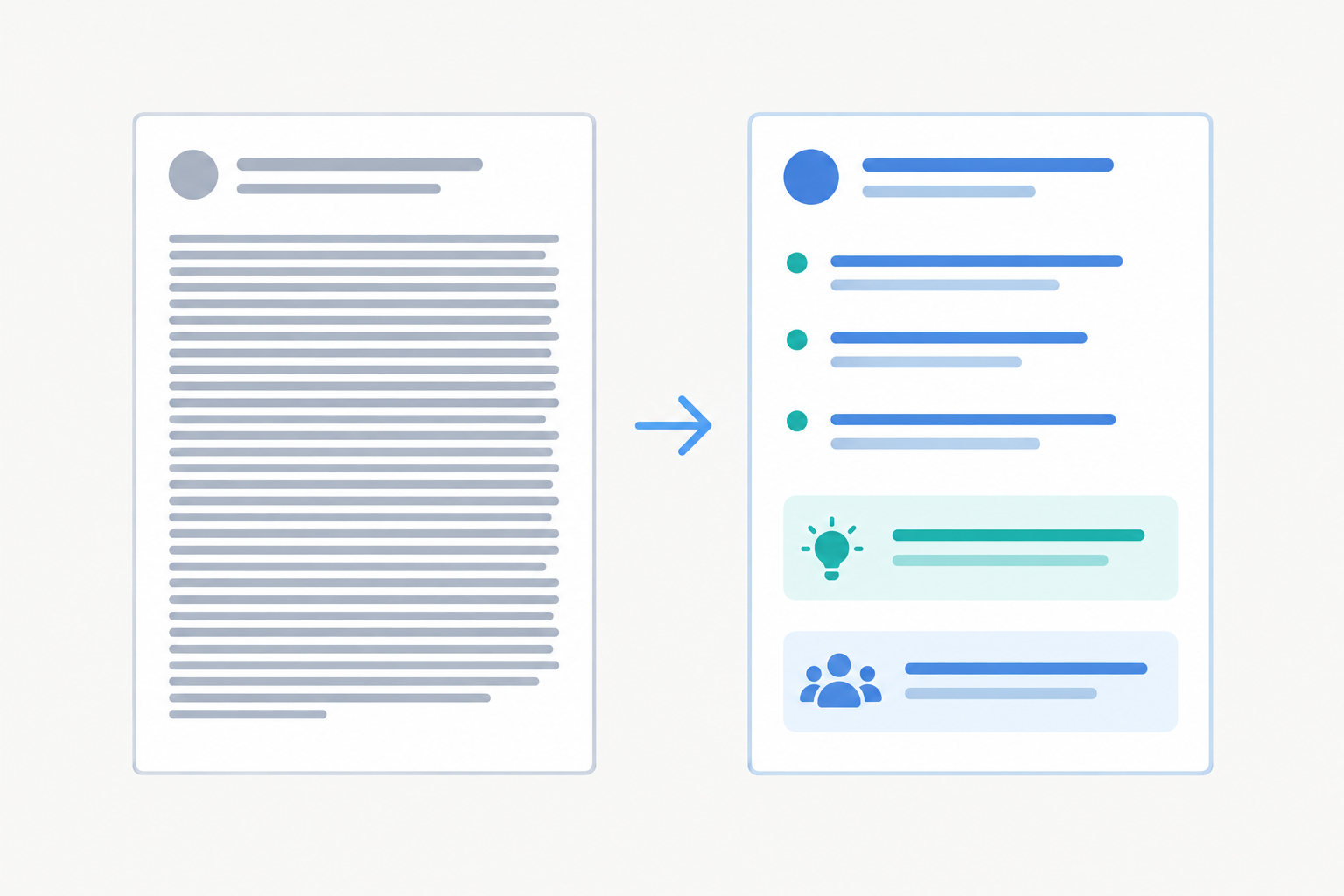
Before: 'Refunds are handled in line with our policy, which may vary depending on the circumstances of the order and the time elapsed. Customers are encouraged to get in touch with our team, who will review each case individually and advise accordingly.'
After: 'You can request a refund within 30 days of delivery. Refunds go back to your original payment method within 5 working days of us receiving the item. Applies to: physical orders from BrandName. Doesn't apply to: gift cards or personalised items.'
Same topic, but the second version gives a copilot (and a customer) something solid to work with.
Step 4: Test your AI support copilot with real customer questions
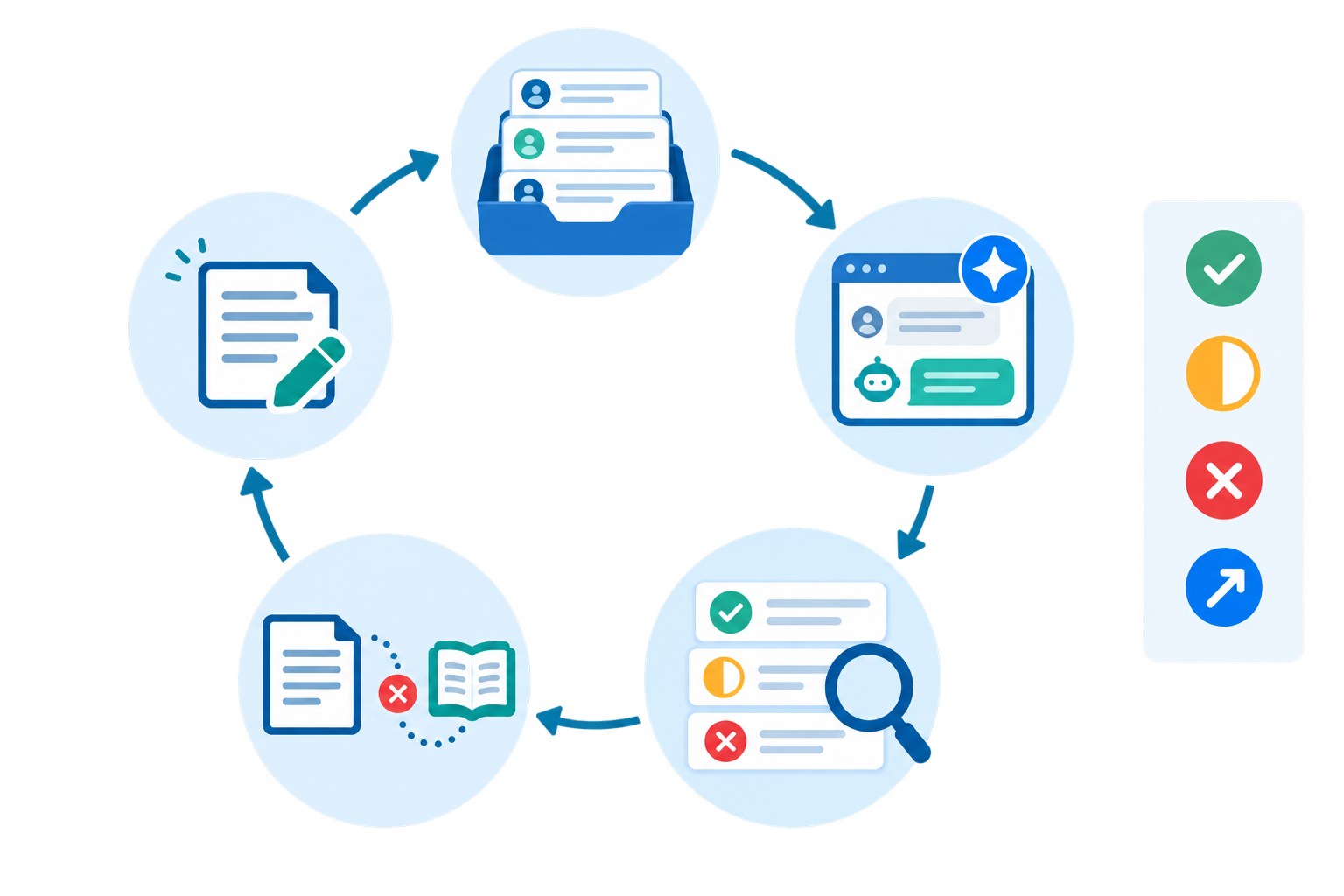
Here's where you find out whether the prep has worked. Don't rely on a polite demo question like 'How do I reset my password?' Your customers don't write like that. Here's a loop that works:
- Collect real questions. Build a test set of 30 to 50 from past conversations, covering every brand. Include the messy, vague and multi-part ones: 'Hi, it's not working again and I was charged twice??' is a perfectly good test. Add some trick questions that could be confused between products, like 'How do I export my data?' where the answer differs for each brand.
- Run the copilot. Let it draft replies for each question, without peeking at the docs first.
- Score the drafts. Use four simple labels: accurate, partly accurate, wrong, or should have escalated.
- Trace misses to their source. Was it a missing doc, an unclear doc, a conflicting doc, or the wrong brand? That diagnosis tells you exactly what to fix.
- Fix and re-test. It's tempting to patch with one-off instructions, but fixing the source helps every future answer, not just that one.
How do you know when your copilot is ready?
Start small. Let the copilot draft in a low-risk area first, such as general how-to questions, and widen its use as results improve. 'Agents accept most drafts' is a fuzzy target, so I'd set a threshold for each risk level and brand instead. You might expect high accuracy on routine how-tos, but require near-perfect results, with a human always involved, for billing or legal topics. Track wrong answers and missed escalations separately from the acceptance rate, because a busy agent who isn't looking closely can accept a draft that's wrong.
That 'should have escalated' score deserves special attention. A copilot that confidently answers a legal question it shouldn't touch is a bigger problem than one that gets a shipping time slightly wrong.
Will agents still review AI copilot replies?
Short answer: yes, and I'd say they should. The model that works best is draft and review. The copilot suggests a reply, your agent reads it, edits it and sends it. Nothing goes out without a person making that call.
This is the approach Sonny's optional AI copilot is built around. It works from your company docs inside the same shared inbox as your live chat, email ticketing and internal notes. Features, plans and pricing can change, so check Sonny's current pricing page for what's included and what it costs in your currency.
A few habits make the human side much stronger, whatever tool you use:
- Use internal notes and tags to flag bad drafts. A quick tag like 'docs-gap' or 'docs-wrong' captures the problem as part of normal work, with no extra process needed.
- Define escalation rules. Write down which topics always go to a person: billing disputes, legal questions, complaints from clearly angry customers, anything involving security or personal data.
- Treat every correction as a docs task. When an agent rewrites a draft, that's a signal. Fix the doc, not just the single reply.
This is the part I find most encouraging. Your team's day-to-day corrections can keep your documentation honest.
Step 5: Keep your help docs up to date as your product changes
Docs aren't a project you finish. They're more like a garden: lovely when tended, overgrown when ignored. The good news is that maintenance can be light if you set it up properly.
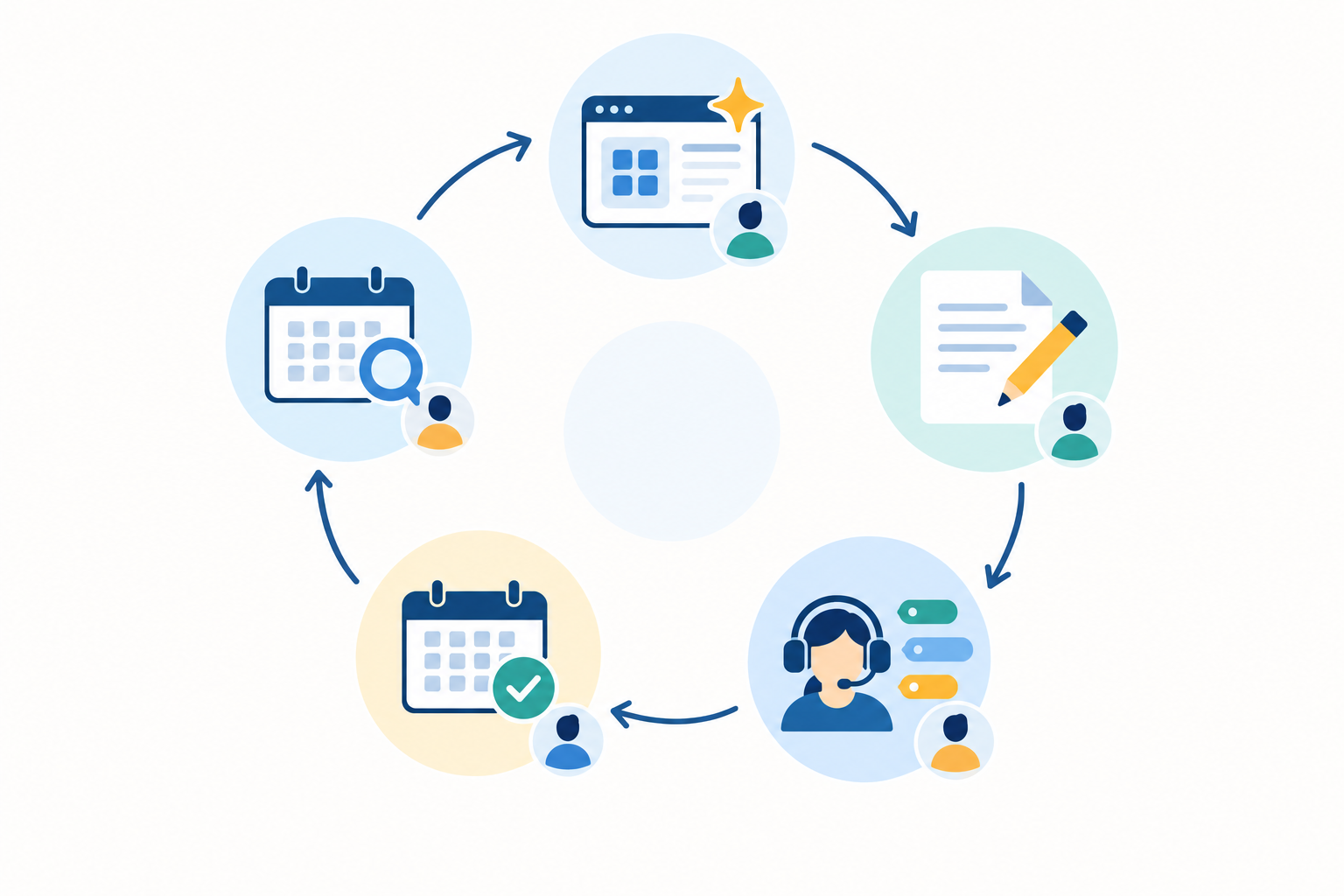
- Assign an owner per brand or product, with a named backup. Articles nobody owns are the ones that rot.
- Add a docs check to your release checklist. If the product changes, the article changes. Make it part of 'done'.
- Review on a rhythm: a monthly look at your most-used articles, and a quarterly sweep of everything else.
- Build a feedback loop. Agents tag conversations where the docs were missing or wrong, and someone reviews those tags weekly.
- Watch a few simple signals. Response times, how often drafts need heavy edits, and repeat questions will tell you whether your docs are working.
- Show 'last reviewed' dates on articles, and retire anything that no one owns.
- Keep a lightweight changelog, so the team knows what shifted and why.
If you're already using a shared inbox with tagging, filtering and reporting, you've got most of the machinery in place. You just need to point it at your docs.
AI support copilot readiness checklist
Here's a quick list to run through before you go live:
- Every article is tagged by product or brand and dated
- No known contradictions on pricing, policies or feature names
- Policy, privacy and consumer-rights wording has been checked by the right owner
- Your top 20 questions are covered with clear, short answers
- Escalation and tone guidance is written down
- A test set has been run and the results reviewed, including missed escalations
- Named owners are in place, with a recurring review slot in the calendar
If you can tick most of those, you're in good shape. You don't need perfect docs. You need honest, current and well-organised ones, and depending on how much you have, a small team can often get there in a week or two. Start with one brand, learn what works, then roll the approach across the rest.
Frequently asked questions about AI support copilot help docs
What docs does a support copilot need?
At a minimum: help articles for common how-to and troubleshooting questions, clear policies such as refunds and cancellations, accurate product and pricing facts, and guidance on tone and when to escalate. Keep internal-only or draft material out, and have policy and privacy wording approved by the right owner first.
Should internal notes go into the copilot's knowledge source?
Generally, no. Internal notes are often informal, out of date or not meant for customers. If a note contains something useful, turn it into a reviewed article first, then add that. Check your own tool's settings to see what it can and can't access.
How do I keep help docs up to date?
Give each product or brand an owner, add a docs check to your release process, and review your most-used articles monthly. Let agents tag conversations where an answer was missing or wrong, so fixes come straight from real customer questions.
Can an AI support copilot handle several products or brands?
Often, yes, provided your content is clearly separated by product or brand and each article states which product it covers. Separation reduces cross-brand mistakes but doesn't remove the need to test how your copilot handles routing and sources.
How do I manage shared-feature articles across brands?
Where you can, keep one shared article and reference it from each brand's collection. If you duplicate it, give all copies a single owner, link them together in your audit spreadsheet, and update them in the same sitting.
Will agents still review replies before they go out?
With a draft-and-review approach, yes. The copilot suggests a reply, and your agent checks, edits and sends it. This keeps a human in control, especially for sensitive topics like billing or legal questions.
How many docs do I need before I start?
There's no magic number. Cover your top 20 or so customer questions accurately for each brand, then expand as you spot gaps through testing and day-to-day conversations in your shared inbox.