

If you only remember one thing from this post, make it this: stop treating every trial message equally. Reply fast to anything that blocks activation, keep casual questions light and quick, and tag every trial conversation so you can see which questions stall people and fix them at the source. Do that in a shared inbox your whole team can use, and you can support free trial users without living in your inbox.
That's the whole idea. The rest of this guide shows how to put it into practice, even if you're a founder answering support between product work, sales calls, and the occasional sandwich. 🥪
Why SaaS customer support for trial users affects conversion
Picture this. A trial user signs up on a Tuesday afternoon, gets to step three of setup, and hits an error. They send you a quick email at 4pm. You're in the middle of an investor update, so you plan to reply 'in a bit'. By the time you do, it's the next morning, and they've opened a competitor's free trial in another tab. They never came back.
I've seen versions of this story again and again. Trial users decide in days, not weeks. They're comparing two or three tools side by side, and they have very little patience for anything that gets between them and seeing value. One unanswered question can end an evaluation before you even knew it had started.
Let me be clear about what the research does and doesn't prove. Salesforce's State of the Connected Customer report (2023 edition) found that 80% of customers say the experience a company provides is as important as its products or services. That's a general customer-expectations finding, not a measurement of trial conversion. I'm not aware of a solid public study showing a precise conversion lift from faster trial replies. So treat what follows as sensible practice that fits what we know about customer expectations, not a guaranteed uplift. Support is part of the product experience people are judging, and in a trial that judgement happens fast.
So why do founders burn out? Because every trial feels urgent. Each signup might become a paying customer, so every message gets treated like a fire. You end up answering 'does this integrate with Zapier?' with the same intensity as 'I can't log in.'
The way out is tiered support:
- Fast for anything that blocks progress
- Light-touch for casual questions
- Tagged and reviewed for patterns, so you fix the cause instead of answering the same question forever
Which free trial questions deserve a fast reply?
Here's the rule of thumb I'd pin above your desk: can the user move forward without an answer?
If the answer is no, it's a blocker, and it goes to the top of the pile. If they can carry on and explore while they wait, you can handle it more calmly.
| Tier | Example messages | Reply speed | Reply style |
|---|---|---|---|
| Tier 1: Blocker (green) | 'I can't connect my Stripe account.' 'The import keeps failing.' 'I was charged but can't log in.' 'Can it do X? We're deciding by Friday.' | Fast, during working hours | Personal, specific, and human |
| Tier 2: Casual (amber) | 'How do I change my notification settings?' 'Is there a dark mode?' 'It would be great if you added Y.' | A few hours | Short reply or a link to a help doc |
| Tier 3: Repeat or vague (blue) | 'It's confusing.' The fifth person this week asking where to find the API key. | Next working day, or batched | Tag it, reply briefly, review weekly |
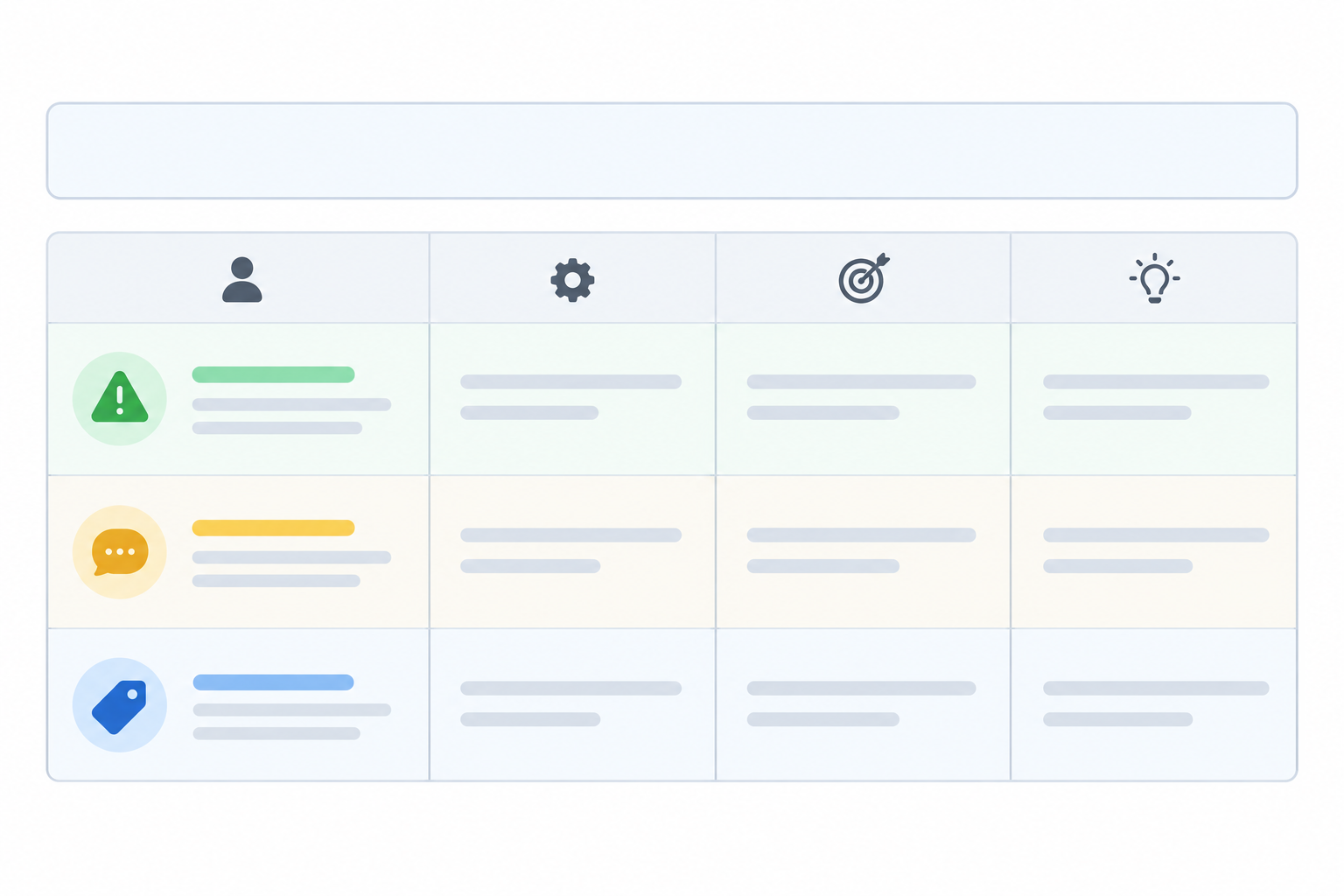
Tier 1: Setup blockers and near-decision questions
This covers setup problems, integration errors, billing or access confusion, and 'can it do X?' questions from people who are clearly close to deciding. A fast, helpful reply here can genuinely change the outcome. Drop what you can and help.
Tier 2: Light-touch replies for casual questions
Think general how-to questions, feature curiosity, feedback, and nice-to-haves. You don't need a three-paragraph essay. A friendly two-liner with a help article link is perfect, and saved replies make it a ten-second job.
Tier 3: Batch repeated questions and learn from them
Vague messages and repeated questions are gold, just not for replying to instantly. Reply kindly, tag them, and look at them together once a week. If five people asked the same thing, the fix isn't a faster reply. It's a better onboarding step.
💛 A gentle note: it's completely fine to not reply instantly to everything. Tiering isn't neglect. It protects your energy for the moments that matter.
How fast should you reply to free trial users?
I'd love to hand you one magic number, but there isn't a universally correct reply time for trial users. It depends on your channel, your working hours, and your volume. Think of the figures below as starting points, not benchmarks:
- Tier 1 (blockers): a first reply within 15 to 30 minutes during your stated working hours. If you can't give a full answer, send a quick 'Looking into this now' so they know a human has it. Aim to resolve it, or have a clear plan, within the hour.
- Tier 2 (casual): within a few hours on working days.
- Tier 3 (low priority or batched): by the next working day.
How to set response time targets you can actually keep
Before you commit to those numbers, check three things:
- Volume: if you get three trial messages a day, 15 minutes is realistic. If you get sixty, you'll need a rota or a longer window.
- Coverage: who is actually online between 9am and 5pm UK time? If it's only you, and you have sales calls on Tuesdays, build that in.
- Track record: start with a target you could hit nine times out of ten. You can tighten it later, but it's much harder to walk back a promise.
For context on what people expect, HubSpot's customer service statistics report that around 90% of surveyed consumers rate an immediate response as important or very important, and around 60% define 'immediate' as 10 minutes or less. Survey editions and wording vary, so check the current figures before quoting them. It's also a consumer-wide benchmark, not a SaaS-trial one, so please don't read it as a mandate to hit 10 minutes on every channel. I take it as a reminder that people feel speed, especially when they're stuck.
Fast means predictable, not instant around the clock
If I could stress one thing, it's consistency. A user who knows you reply to blockers within the hour on weekdays is far happier than one who gets a reply in five minutes on Monday and two days later on Thursday. Aim to be reliably quick, not heroically available.
Set realistic support hours for UK-based founders
If you're in the UK with trial users in the US, your afternoon is their morning, and your evening is their working day. Rather than staying up late, pick realistic hours and state them clearly. A US user who signs up at 5pm Eastern will happily wait until your morning if they know that's coming. For European users, you're likely well covered already.
Use support reports to check your response times
Don't guess whether you're hitting your own targets. Most help desk tools, Sonny included, report on first-response times, so a quick monthly look will tell you whether your promises match reality. A fast first reply doesn't prove people got unstuck, though, so check it against whether trial users actually reached activation.
Live chat for SaaS: Help trial users with in-the-moment blockers
So, is live chat worth it during a free trial? Honestly, yes, for blockers. But only if it doesn't chain you to your screen all day.
A live chat widget on your signup, onboarding, and pricing pages catches people at the exact moment of confusion. Someone hovering over the pricing page wondering whether you support multiple users can ask in ten seconds, instead of writing an email they'll probably never send. That's why live chat for SaaS works so well in a trial: the gap between 'I'm stuck' and 'I got help' is tiny.
The trick is pairing chat with email ticketing. When you're away from your desk, a missed chat should turn into a follow-up email in the same shared inbox, so nothing falls through the cracks and you can see the whole conversation in one place.
Keep live chat support sustainable
- Set office hours. Show chat as available only when you can really respond.
- Use friendly away messages. Something like 'We're away until 9am UK time, but leave your question and we'll email you first thing' works well.
- Build saved replies for your most common questions, so you're editing rather than typing from scratch.
- Consider an AI copilot trained on your docs for repeat questions, with a human ready to step in whenever a question needs judgement.
A quick (illustrative) story
Imagine a three-person SaaS team that sells a reporting tool. A trial user lands on the onboarding page, tries to connect a spreadsheet, and hits a permissions error. They open the chat widget and type, 'Is this supposed to be failing?' The developer, who happens to be covering support that hour, replies within a couple of minutes, asks them to share the sheet with a specific address, and walks them through it. Five minutes later, the user's first report is built.
The part that matters more comes next. The developer tags the chat integration, and by Friday three more trial users have hit the same permissions error. So the team adds one line of guidance to the connect-your-data step. The following week, that tag nearly disappears.
That's an illustration, not a case study, but it shows what chat is really good for. It rescues one trial and exposes a leak you can fix for everyone after.
Tag trial questions to find onboarding gaps
Here's where support turns into something more useful than answering questions: it becomes research. If you tag consistently, your inbox tells you exactly where your trial experience leaks.
And no, you don't need a heavy analytics stack. You need tags, filters, and a 20-minute weekly habit.
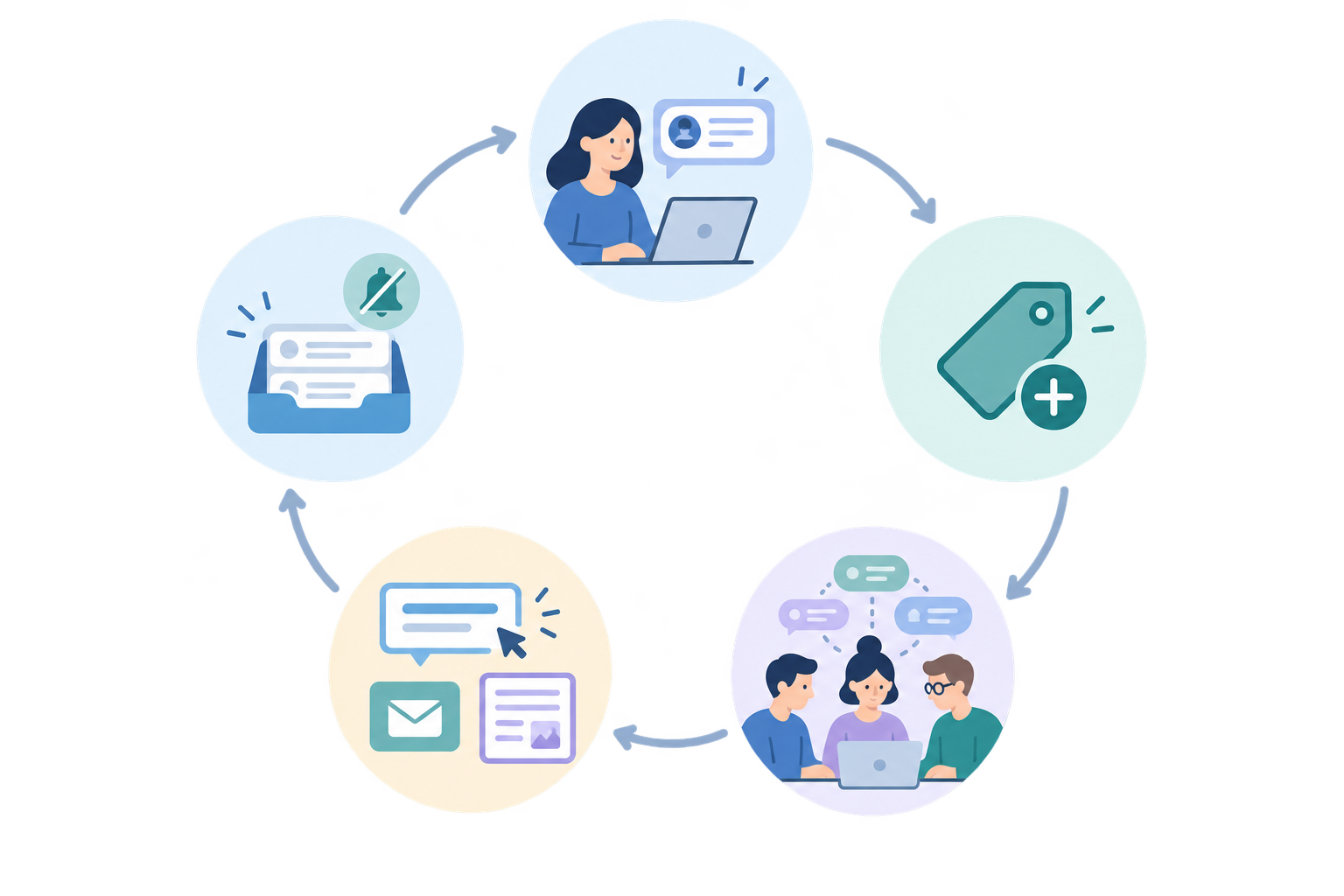
- Create a small, consistent tag set. Start with something like
setup,integration,pricing,missing feature, andconfusing UI. Five or six is plenty. If you have twenty, nobody will use them. - Add a
trialtag. This lets you filter trial conversations away from paying customers, so you're looking at the right data. - Tag every conversation as you reply, even when it takes five seconds. Especially then. The habit matters more than perfection.
- Review tag counts weekly. Look for the top two or three themes and ignore the long tail for now.
- Fix the cause. Add a tooltip, tweak an onboarding email, write a help article, or adjust the product. Then watch whether that tag shrinks over the following weeks.
How do you find out why trial users don't convert?
Compare the tags on trials that converted with those that didn't. If non-converters keep mentioning integration while converters rarely do, you've found your first fix. If pricing questions come up before cancellations, maybe your pricing page needs clearer wording. With a small sample this won't give you statistical certainty, and some people leave without ever writing in, so it's worth adding a short exit question. Still, it points you somewhere useful, and for a small team that's often enough.
Set clear response-time expectations so you can breathe
A clear promise beats a rushed reply every time. People are surprisingly forgiving when they know what to expect, and surprisingly grumpy when they're left guessing. Once you've chosen targets you can keep, tell people about them:
- Chat widget greeting: 'Hi! We're online 9am to 5pm UK time and usually reply within the hour.'
- Auto-reply on email tickets: 'Thanks for getting in touch. We reply within a few hours on working days.'
- Welcome email: one friendly line telling trial users how and when to reach you.
Keep the wording warm and honest. Something like: 'We're a small team and we reply within a few hours on working days. If something's blocking your setup, say so in the subject line and we'll jump on it.' That last sentence quietly does your triage for you.
Plan for weekends, bank holidays, and launch weeks
Don't pretend you're around when you're not. Update your away message ahead of UK bank holidays, and if you're launching something and expect a flood, say so: 'We're a bit busier than usual this week, so replies may take a little longer.' People appreciate the honesty.
Under-promise and over-deliver
Trust builds quickly in a short trial. If you say 'within a few hours' and reply in forty minutes, you've given someone a small, pleasant surprise. If you promise 'instantly' and take three hours, you've let them down. Promise what you can keep, and quietly beat it.
Let your whole team help with trial support without extra seat costs
Can founders handle trial support without a dedicated agent? Absolutely, as long as they're not doing it alone. In a small SaaS company, the people who can answer trial questions are often scattered. The founder knows the customer, the developer knows why the error happened, and the marketer knows how the feature was meant to be explained.
A shared inbox lets all of them contribute. With internal notes, your developer can leave a quick 'this is a known bug, fix goes out tomorrow' for the founder, who then sends the reply and keeps the relationship personal. Nobody needs to forward emails or ask 'who's handling this one?' in a separate chat thread.
Pricing quietly shapes behaviour here. Many help desk tools charge per seat, so adding a helper costs money. You start rationing access: only the founder gets a login, everyone else sends questions over Slack, and suddenly you're the bottleneck. As a purely illustrative example, at $25 per agent per month, ten helpers would cost $250 a month. That's a lot for a company that's still finding its feet.

When you compare tools, look at how each one charges for extra people, not just the headline price. Check each vendor's current pricing page, because plans change.
Try a simple support rota
Try a 'support owner of the day'. One person handles Tier 1 blockers that day, and others tag in when asked. Responsibility stays clear, the load is spread, and no single person is permanently on call. Mobile apps help too, since the owner can catch an urgent blocker from the train or the school run without being tied to a desk. 📱
A simple weekly routine for supporting free trial users
You don't have to overhaul everything. Here's a routine you can start in an afternoon:
- Set up your tools. Get a shared inbox, a live chat widget, and email forwarding running.
- Define your three tiers and write down response targets you can keep. A sticky note is fine.
- Create your starter tag list (including
trial) and a small library of saved replies. - Block 20 minutes each week to review tags, spot the top theme, and pick one fix.
- Check response time reports monthly and adjust your tiers or hours if you're missing targets.
That's it. You don't need a big team or a big budget to make trial users feel looked after. You need a bit of structure, a shared inbox, and the confidence to not answer everything at once. You've got this. 💪
A note on the tool I use
I work on Sonny, a shared inbox with live chat, email ticketing, and an optional AI copilot, so I'm biased. Everything above works with any help desk that offers those basics. If you want to try ours, at the time of writing Sonny costs a flat $19.99 a month (roughly £16, billed in USD, so exchange rates will move), with unlimited agents and unlimited conversations, and a 7-day free trial that doesn't need a credit card. It also has native iPhone, Mac, and Android apps. Plans, limits, and features can change, so please check Sonny's pricing page for the current details before you decide.
FAQ: Supporting free trial users
How fast should I reply to trial users?
Start with a first reply within 15 to 30 minutes for blockers during working hours, and a few hours for general questions. Adjust for your volume and coverage, and tell people what to expect.
Is live chat worth it during a free trial?
Usually, yes. Chat catches users at the moment they're stuck. Keep it manageable with set hours, saved replies, and email ticketing as a fallback.
How do I find out why trial users do not convert?
Tag every trial conversation by topic, then compare the themes across users who converted and users who didn't. Repeated tags like setup or integration show which onboarding gaps to fix first.
Can founders handle trial support without a dedicated agent?
Yes, with tiered support and a shared inbox. Founders can focus on blockers while teammates handle technical or casual questions, as long as your tool doesn't penalise you for adding helpers.