
5 Signs Your Support Team Has Outgrown Email Ticketing
If your team is duplicating replies, losing track of who's handling what, or can't answer "what's our average response time?" without opening a spreadsheet, there's a good chance your email ticketing system has quietly become the bottleneck. These aren't signs of a lazy or disorganised team. They're the predictable symptoms of a support process that worked fine at ten enquiries a day but starts to creak as you scale.
Quick definitions, because these terms get used loosely: a shared email inbox is just one login (or forwarding setup) that multiple people check. Email ticketing adds structure on top of that: assignment, status tracking, and reporting, so a team can actually manage conversations rather than just read them. Help desk software usually goes a step further, adding automation, multi-channel support, and deeper analytics. Plain email was never built to do any of this for a group of people; it's a personal messaging tool that teams stretch to fit a team use case.
Small support teams often assume messy inboxes and slipping response times reflect poor discipline. In my experience, it's almost always a tooling gap instead. The process worked fine for one person, and nobody's rebuilt it since a second or third person started answering the same inbox.
So how do you know if this is you? Below are five signs that tend to show up when a team has hit that ceiling, what's actually missing under the hood, and a straightforward way to think about whether it's time to move from email ticketing to a shared inbox or more capable customer support software.
Sign 1: Messages Are Getting Lost or Duplicated
You know the moment. Someone asks, "Did we ever reply to that customer about their refund?" and everyone just looks at each other. Maybe Sarah handled it. Maybe it's still sitting in the inbox. Or, worst case, two people replied separately, and now the customer has two different answers to the same question.
The underlying issue is auditability. A standard inbox has no collision detection to warn a colleague that someone else is already typing a reply, and forwarding or CC'ing a teammate creates a copy, not a shared record. Context gets buried under "Re: Re: Fwd:" chains, and before long nobody can reconstruct the full history of a conversation.
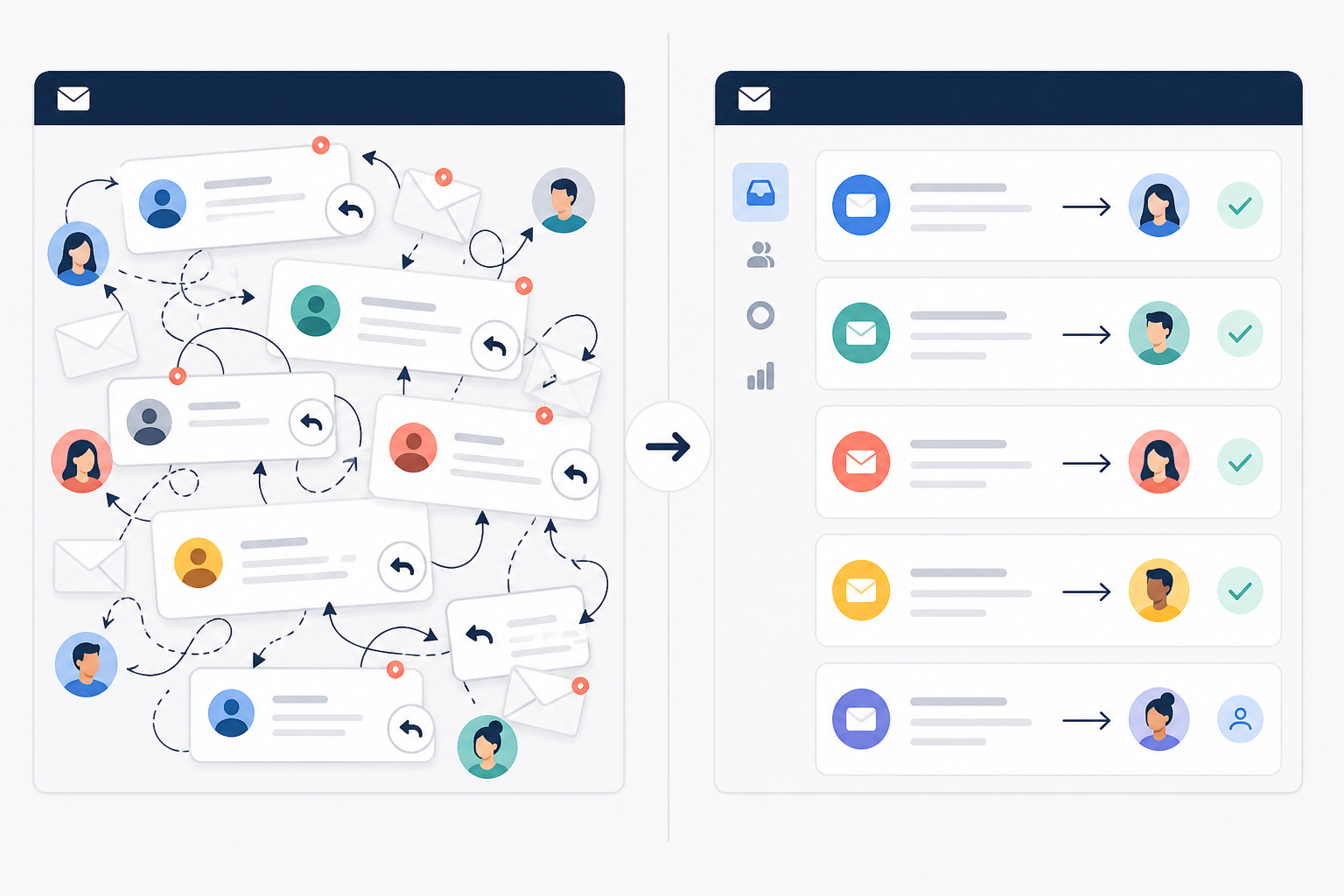
A proper email ticketing system fixes this by giving every conversation a clear owner, a visible status, and one thread the whole team can see in real time. It won't eliminate every mistake, but it removes the guesswork that causes most of them. A quick test: pick five conversations from last week and see how long it takes anyone to explain, without checking, exactly what happened and who handled it. If that takes more than a minute, this is already costing you.
Sign 2: You Can't Tell Who's Handling What
This is related to Sign 1, but it's really its own problem: it's about unclear ownership, not just duplicated replies. When everyone has access to the same inbox but nobody's officially assigned to anything, a strange paralysis sets in. Everyone assumes someone else has it covered. Often, nobody does.
I think of this as the "silent ticket" problem. A message sits there quietly, not urgent enough for anyone to jump on, not clearly anyone's job, until the customer follows up, understandably annoyed, a few days later. Then there's the opposite scenario: a customer escalates ("this is my THIRD email about this!") and several people scramble to respond at once, tripping over each other.
A basic routing rule solves most of this. For example: billing questions get assigned to whoever's covering finance that day, and anything flagged urgent gets escalated to a senior team member within one business hour if it hasn't been picked up. That's not a software feature. It's a decision your team makes, and the tool just enforces it. Email ticketing tools let you assign a conversation to a specific person the moment it arrives and tag it by topic, which makes ownership visible at a glance instead of something everyone has to guess at. But the software only creates visibility; your team still has to build the habit around it.
Sign 3: You Have No Visibility Into Response Times
Here's a question worth asking yourself right now: what's your team's average first-response time? If you don't know, or you'd have to dig through hundreds of emails and do some rough mental maths to estimate it, that's a sign in itself.
It's worth being precise about what "response time" even means, because teams often conflate several metrics:
- First-response time: how long until a customer gets any reply at all
- Average response time: the typical gap between messages across a whole conversation
- Resolution time: how long until the issue is actually closed out
- Business-hours response time: response time measured only during your working hours, which matters for UK teams supporting customers across time zones
- SLA compliance: the percentage of conversations meeting whatever service-level agreement (SLA) target you've set
If you don't have a tool tracking this yet, you can still get a rough baseline manually: pull the last 30 days of a sample inbox, timestamp 20–30 conversations, and calculate the average first-response time by hand. It's tedious once, but it gives you a number to work from and a target to review weekly. Most teams discover their response times are slipping the hard way: a customer says "I've been waiting two days for a reply" before anyone internally notices a pattern.

This lack of visibility is especially rough for founders and support managers making hiring decisions without any real data. Even a five-person team benefits from a simple dashboard showing average first response, resolution time, and the trend over the past month. It turns guesswork into an actual conversation about priorities.
Sign 4: Live Chat Requests Are Piling Up Elsewhere
This one's increasingly common as customers expect faster, more casual ways to reach out. Maybe you've got a live chat widget on your site. Maybe customers message you on Instagram. Maybe there's a separate chat tool your team checks whenever someone remembers to.
The core problem here is specifically about live chat and email, two channels with genuinely different expectations. Someone using live chat expects a near-instant reply. Someone emailing expects a more considered response within a few hours. When those two channels are disconnected, your team ends up juggling browser tabs and treating one like the other: too slow for chat, too rushed for email.
Social DMs are a related but separate issue, and it's worth treating them as their own evaluation criterion rather than assuming any "unified inbox" claim automatically covers them. Some tools merge email and live chat cleanly but handle Instagram or Facebook messages as a bolted-on integration, or don't support them at all. If social channels matter to your team, ask specifically how a tool handles them. Don't assume it's included just because email and chat are unified. Channel unification also generally depends on matching a customer's identity across channels (same email, same account), which isn't always automatic either.
Sign 5: Reporting Requires Manual Spreadsheets
If your idea of "reporting" involves opening a spreadsheet once a month and manually counting how many tickets came in, how many got closed, and roughly how long things took, that's hours of tedious, error-prone work that decent help desk software should handle automatically.
For a small team, the minimum useful dashboard usually covers: incoming volume, current backlog, first-response time, resolution time, how many conversations get reopened, and volume broken down by topic or channel. That's not an exhaustive list, but it's enough to answer the questions that actually matter: is your team getting faster or slower this quarter? Is one day of the week consistently brutal? Are certain ticket types taking noticeably longer than others?

This also affects one of the biggest decisions a growing team faces: when to hire. Without real numbers, you're guessing whether your team is genuinely stretched thin or just having a busy week. Automated reporting gives you ticket volume trends, response times, and team performance so that decision rests on evidence rather than a hunch.
Quick Diagnostic: Is Your Team Ready for a Shared Inbox?
Here's a compact way to map each symptom to what's actually missing, and a quick way to test for it yourself:
| Symptom | Operational risk | What's missing | Quick test |
|---|---|---|---|
| Duplicated or lost messages | Inconsistent answers, customer frustration | Collision detection, shared status | Can anyone explain a random past conversation in under a minute? |
| Unclear ownership | Tickets sit untouched or get double-handled | Assignment, routing rules | Ask "who owns this?" on five open tickets right now |
| No response-time visibility | Slipping standards nobody notices | Automatic metric tracking | Try to state your average first-response time without checking |
| Disconnected channels | Wrong tone, missed messages | Unified inbox across channels | Count how many tabs someone needs open right now |
| Manual reporting | No trend visibility, guesswork hiring | Built-in analytics | Time how long your last monthly report took to build |
As a rough heuristic, not a proven rule: zero or one of these showing up regularly probably means a bit of process tightening will help. Two or three is a reasonable signal to trial a shared inbox. Four or five suggests reporting and migration should become a priority soon rather than later.
When Might Email Still Be Enough?
Not every small team needs to rush out and replace email. If you're a solo founder handling support yourself, or a two-person team with only a handful of enquiries a day, a well-organised inbox with folders and labels might genuinely be fine for a while longer. The tipping point isn't a magic number of tickets, it's whether you're regularly experiencing two or more of the five signs above. Some teams feel the strain at 15 conversations a day; others coast until 40 or 50 because their process is unusually tidy. Volume matters less than whether ownership, visibility, and reporting are already breaking down.
What Should You Do About Outgrowing Email Ticketing?
If you're nodding along to a couple of these signs, here's a practical path forward.
- Audit your current volume and channels. How many conversations does your team handle per day, and across how many channels, email, chat, social, maybe a phone line? Count everything; the real number often surprises people.
- List every place customers currently reach you. This becomes your checklist for what any new tool needs to support, and it'll quickly reveal whether "unified inbox" claims from vendors actually match your situation.
- Build an evaluation checklist beyond basic features. Look for assignment and collision detection, internal notes, clearly defined reporting metrics, integrations with tools you already use, permission controls for who can see what, and straightforward data export.
- Check data handling and compliance. If you're supporting UK or EU customers, ask where customer data is stored and how the provider handles GDPR obligations. This matters more once you're storing conversation history at scale.
- Prioritise flat-rate pricing if you're a growing team. Per-seat pricing punishes you for the exact thing you're trying to do: grow your team. Check total cost including VAT, not just the headline price.
- Plan the migration itself, not just the tool. Export your historical email data, configure routing and permissions before go-live, test how notifications actually behave, and run the new setup alongside email for a week or two before switching over fully.
- Test with a free trial before committing. Ideally one that doesn't require a credit card upfront, so you can properly kick the tyres without pressure.
A Quick Example: Sonny Customer Support Software
Sonny is one example of customer support software built for small teams who've outgrown email but don't want the cost or complexity of enterprise help desk platforms. I want to be upfront here: pricing, features, and trial terms for any SaaS product change over time, so treat the details below as a snapshot rather than gospel, and check Sonny's own pricing and features pages directly before making a decision.
At the time of writing, Sonny's general positioning includes:
- A shared inbox that unifies email and live chat, worth confirming current social DM support directly if Instagram or similar channels matter to you, since that's often more limited than email and chat coverage
- Flat-rate pricing with unlimited agents, rather than per-seat pricing, so growing your team doesn't automatically grow your software bill
- A setup process aimed at small teams without lengthy onboarding calls
- Built-in reporting covering first-response time, resolution time, and team performance trends
- Native apps alongside browser access
- A free trial that doesn't require a credit card upfront
Tools like Sonny tend to suit small teams, roughly two to fifteen people, who need more structure than email but don't want enterprise-level complexity. If you're a solo support person, need advanced automation or extensive third-party integrations, or need dedicated compliance certifications for a regulated industry, it's worth comparing a few options rather than assuming any single tool fits. The point isn't that Sonny is the only answer. It's that this category of tool exists, and it's worth trialling one against your actual workflow rather than staying on email by default.
Frequently Asked Questions About Email Ticketing and Help Desk Software
How do I know my team needs a real help desk tool instead of just email?
If you're experiencing two or more of the five signs above, lost messages, unclear ownership, no response-time visibility, disconnected channels, or manual reporting, that's a reasonably strong signal, treated as a practical heuristic rather than a hard rule. Ticket volume alone isn't the deciding factor; the pain points tend to show up before the numbers force the issue.
What are the limits of managing support through email alone?
Email was built for one-to-one conversations, not team collaboration. It typically lacks reliable assignment, collision detection, internal notes, and built-in reporting, all things that matter once more than one person is answering customer messages. It also has no native way to unify chat or social messages alongside email threads.
When should a startup switch from email to a shared inbox?
There's no universal ticket-volume threshold, and any claim of an exact number should be treated with some scepticism. What matters more is whether you're seeing the signs above repeatedly. Some teams feel friction at a dozen conversations a day; others manage comfortably at higher volumes if their process is unusually disciplined.
What problems does email-only support cause for teams?
Beyond the five signs covered here, email-only support tends to create slower onboarding for new hires (no ticket history to reference), inconsistent customer experience, and a lack of accountability since there's no clear record of who handled what.
What should I check before migrating away from email?
Confirm you can export your existing email history into the new tool, test that notification and assignment rules actually behave the way your team expects, and run the new system alongside email for a short overlap period. Also check how the provider handles data storage and security, particularly if you're dealing with UK or EU customer data under GDPR.