

Consolidating Support Tools After a Merger or Acquisition

If you've just merged with or acquired another brand, consolidating support tools means auditing what each brand uses, deciding what history you actually need to keep, migrating in a planned order, training the combined team on one system, and telling customers early about what will change. Run both setups side by side for a short, clearly defined window, with one shared inbox as the destination and a named owner for every incoming conversation. Test your routing properly, and conversations are far less likely to fall through the cracks.
That's the whole plan in a paragraph. The rest of this guide is the detail that makes it work. 😊
The support chaos of mergers and acquisitions
Picture the first Monday after the deal closes. You now have two brands, two help desks, three support email addresses, and a live chat tool nobody remembers buying. A customer emails brand A, gets no reply within an hour, and writes to brand B's address as well, just in case. Now two agents in two tools are working the same problem without knowing about each other.
Support is often the first place a merger shows its seams. Finance, legal and engineering can integrate quietly behind the scenes for months. Customers feel every wobble straight away, because they only ever see the front door.
The symptoms are pretty familiar:
- Customers send duplicate tickets because they don't know which address counts
- Response times differ between the two teams
- Agents log into four tools just to answer one question
- Nobody has a single view of a customer who buys from both brands
This matters more than it might seem. Salesforce's State of the Connected Customer research (2023 edition) reported that 56% of customers say they often have to repeat or re-explain information to different representatives, and 80% say the experience a company provides is as important as its products. Those are survey findings from a broad customer sample rather than merger-specific data, but they explain why a disjointed support experience is so easy for customers to spot.
There's a quieter cost too: per-seat pricing. When two teams combine, every extra agent can add to the bill, so you end up rationing logins or paying for a bigger plan just to let people help each other. Some tools use flat-rate pricing with unlimited agents instead, which can suit merged teams (more on that below). Whatever you choose, work out the combined-team cost before you commit.
This guide is for teams who want one shared inbox across several brands while keeping each brand's identity intact. You're not erasing anyone. You're giving your team one place to work.
Auditing existing tools and data before you consolidate support tools
Audits sound dull, I know. But I've seen teams skip this step and then discover, three weeks later, that a forgotten shared Gmail account was quietly receiving refund requests. Let's avoid that.
Work through these six steps before you touch anything.
- List every customer-facing channel for each brand. Include live chat widgets, support email addresses, contact forms, social inboxes and any forgotten shared Gmail accounts. Ask your team, then check your website footer, your checkout emails and your app store listings.
- Inventory the tools behind those channels. That means help desk software, chat tools, knowledge bases, automations, and integrations with your CRM or e-commerce platform. Note who owns each one, and look at user accounts too. Former employees and duplicate logins shouldn't follow you into the new setup.
- Check contracts, renewal dates and notice periods. You don't want to pay for duplicate tools longer than necessary, but cancelling too early leaves you with no fallback. Also check what each supplier contract says about data export and deletion, and whether the contract can be transferred or needs to be renegotiated after the deal.
- Map the data you hold. Think ticket history, customer records, tags, canned replies, attachments and internal notes. For each, decide whether it must be kept, can be archived, or can go.
- Review your UK data protection position. If you handle personal data of people in the UK, UK GDPR applies, and an acquisition raises some specific questions. Establish which organisation is responsible for which data (who is the controller, and who is acting as a processor for whom), and make sure that's documented. Check what the transaction paperwork and your supplier contracts allow you to do with each brand's customer data, and that you still have a lawful reason to use it for support. Look at who has access to what, and give agents only the access their role needs. If any tool stores or processes data outside the UK, check whether additional transfer safeguards apply. Where the data is physically stored doesn't settle compliance on its own. The ICO's guidance on data sharing is the place to start, and it's worth asking your legal adviser or data protection officer to review the plan.
- Capture your baseline. Record first response time, resolution time, backlog, reopen rate and volume per brand, along with the date ranges and definitions. Otherwise you can't prove the consolidation helped, or spot it if something slips.

A copyable audit worksheet
A simple spreadsheet does the job. Use these columns and add a row for every tool, mailbox and integration:
| Tool | Owner | Monthly cost | Renewal date | Data held | Keep or retire |
|---|---|---|---|---|---|
| Brand A help desk | Sam | £— | — | Tickets, tags, canned replies | Retire after migration |
| Brand B chat widget | Priya | £— | — | Chat transcripts | Retire after overlap |
| support@brandb.com | Priya | — | — | Email history | Keep, forward to shared inbox |
It's not glamorous, but this one sheet will guide almost every decision in the rest of the project.
Choosing help desk software and a shared inbox for multiple brands
Before you pick where everything's going, it helps to know what good looks like. Here's what I'd look for in help desk software or a shared inbox when the goal is one inbox for several brands.
- Separate brand identities. Each brand's live chat widget and support address should look and sound like its own. Customers shouldn't feel they've contacted the wrong company.
- One shared inbox where the whole team can see, filter and tag conversations by brand.
- Email-to-ticket forwarding, so existing support addresses keep working with no change on the customer side, plus the ability to reply from the right brand address.
- Internal notes and team collaboration, so agents from the two companies can hand off and ask questions without leaving the thread.
- Reporting by brand. A single company-wide average can hide a problem affecting one acquired brand, so you want response times and team performance broken down.
- Pricing that doesn't punish a bigger team. Check whether agents, conversations or brands are priced separately, and work out the cost for your combined headcount.
- Quick setup and a trial. A free trial lets you test with one brand before committing, and low setup effort keeps the timeline manageable.
- Reliability and access. Combined teams often span time zones, so ask about uptime commitments and whether there are mobile and desktop apps alongside browser access.
- Data export and security. You should be able to get your data out again, and the supplier should be clear about where data is stored and how it's protected.
Here's one example of how that checklist plays out. Sonny is a shared inbox and live chat tool that, at the time of writing, lists a flat $19.99 a month with unlimited agents and conversations, a 7-day free trial with no credit card, setup in under five minutes and a 99.9% uptime SLA. Those are the vendor's own published claims, so check current terms on its pricing and SLA pages before relying on them, and compare it against any other shortlisted tool in the same way.
One practical tip: during your trial, test the brand-specific bits with real examples. Set up one brand's widget and forwarding address, send some test conversations, and check that tagging and filtering by brand work the way your team will need them to. And agree your tags, categories and priority rules before you import anything, otherwise you'll just centralise inconsistent processes in one bigger queue.
Expectations are high, which is why this matters. Zendesk's CX Trends research (2024 edition) reports that around 70% of consumers expect anyone they deal with to have the full context of their situation. A shared inbox can give your agents that context, but only if the history and tagging behind it are sound.
How to merge two support inboxes without losing history
Here's a story I think about often. A customer has spent three weeks going back and forth with brand A about a billing problem. The company merges, support moves to a new system, and the history doesn't come across. The customer writes in again and a friendly new agent says, "Could you tell me what's happened so far?" Three weeks of patience, gone. They tell the story again, more tersely this time, and they don't forget it.
That's why context matters more than completeness. You don't need every ticket from 2016. You need the ones that let an agent pick up a conversation without making the customer start over.
Here's a migration order that works well.
- Decide how much history to bring over. Your options are a full archive, the last 12 to 24 months, or open and recent tickets only. A full archive is complete but noisy and may clash with your retention rules. Recent-only is cleaner but means older queries need a trip to the archive. Many teams land on 12 to 24 months plus anything still open. Write the decision down, along with the reason for it.
- Export from each tool in a standard format, such as CSV, and clean obvious problems first: duplicate contacts, test tickets, spam.
- Standardise tags and categories across brands before importing. If one team says "refund" and the other says "returns", your reports will be a mess afterwards. Keep a simple mapping table so old statuses don't quietly change meaning.
- Migrate one brand at a time, starting with the smaller or lower-risk one. Keep the old system read-only for a defined overlap period, and avoid making changes in both systems at once.
- Redirect support addresses using forwarding. Don't ask customers to learn a new address. With email-to-ticket forwarding, support@yourbrand keeps working and simply lands in the shared inbox.
- Run a side-by-side check. Pick ten real customers and confirm their history shows up correctly: timestamps, replies, internal notes, attachments that open. Include a closed case and a reopened one.
- Keep an archive of what you didn't import, so you can answer a legal or customer request later. That doesn't mean keeping everything forever, though. Set a retention period you can justify, document it, and delete or anonymise data when it's no longer needed, in line with UK GDPR's storage limitation principle.
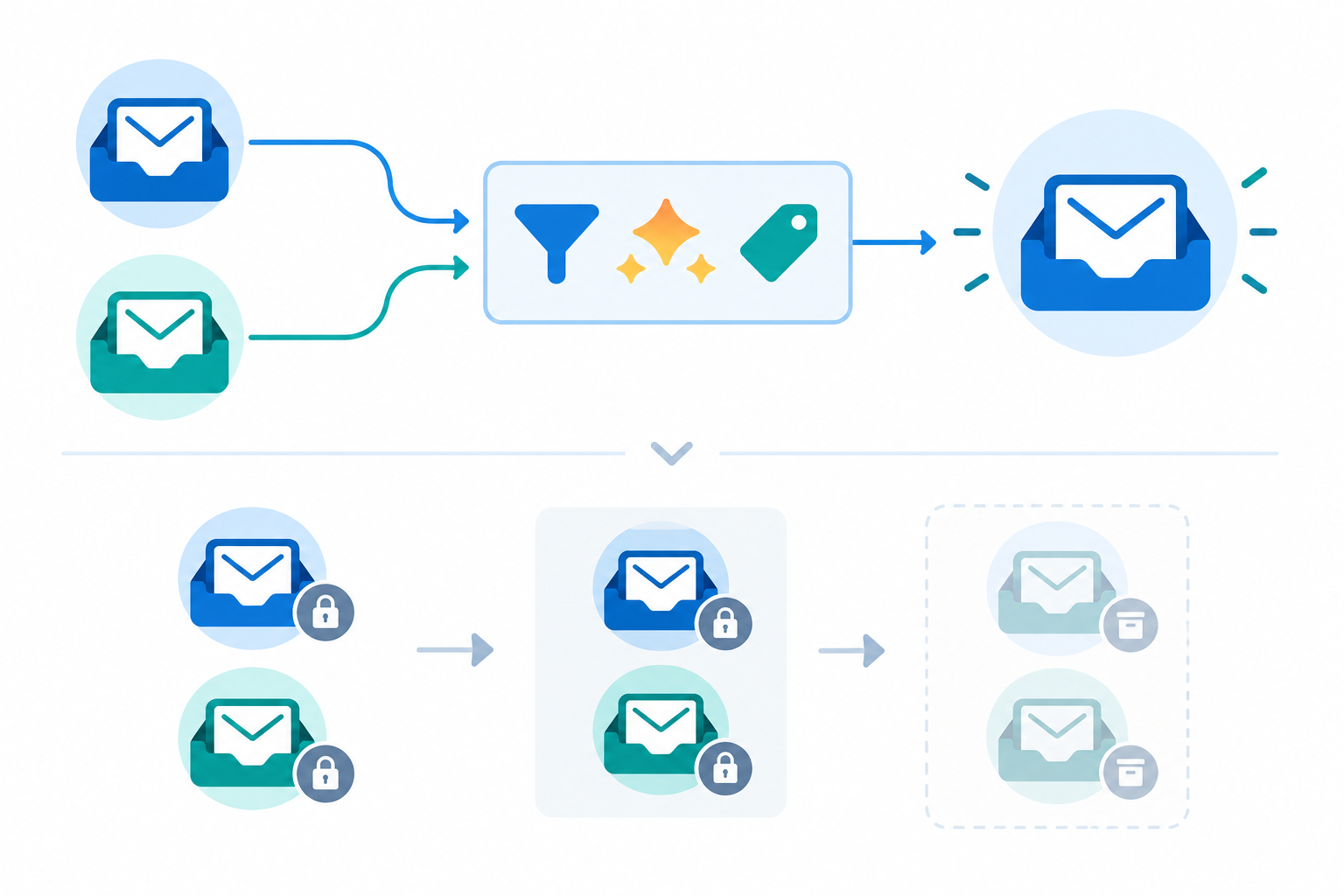
What happens to one conversation on cutover day
It helps to follow a single email from start to finish. A customer writes to support@brandb.com on the Tuesday after cutover. The address is now forwarded into the shared inbox, where a routing rule tags it "Brand B" and assigns it to the Brand B queue. The agent who picks it up sees the imported history from the last 18 months, replies from the Brand B address, and adds an internal note. Nothing is touched in the old help desk, which is read-only. That's the path you want to test, end to end, before any real customer relies on it.
A simple routing rule to start with: if the message arrives via support@brandb.com, tag it "Brand B", assign it to the Brand B queue, and notify the on-call lead if it isn't picked up within your agreed response window.
A cutover checklist
The overlap window is your safety net, but only if you run it deliberately. Before each brand goes live, I'd want these in place:
- One owner per conversation. During overlap, the new shared inbox is the only place to reply. The old system is read-only, and anything that lands there by mistake gets moved across by a named person, not left to whoever notices.
- End-to-end tests. Send test messages to every forwarded address, from outside your organisation. Check they arrive, are tagged and routed correctly, and that replies go out from the right brand address with attachments intact.
- Loop and duplicate checks. Make sure forwarding doesn't bounce messages back and forth between systems, and that auto-replies don't create endless ticket chains or duplicates.
- A named escalation path. Decide who agents contact if something looks wrong, and how quickly they'll get an answer.
- A rollback trigger. Agree in advance what would make you pause or revert, for example messages not arriving, or unanswered emails beyond an agreed number of hours. Know how to point forwarding back to the old system, and who can make that call.
- Close monitoring after go-live. Check queues, bounces and first response times several times on day one, daily for the first week, then weekly until you exit the overlap.
- An exit test. Don't retire the old system until forwarding has been verified, the old system has received no genuine new tickets for an agreed period, your side-by-side check passes, and key metrics are in line with your baseline.
If something didn't import properly, your team can look it up in the old system rather than guessing. That's what the overlap is for. Don't cancel anything until you've checked the export and the numbers add up.
Training combined teams on one help desk system
Let's talk about the human side, because it's easy to forget that a software migration is really a people migration. You have two teams with different habits, different tones of voice, and possibly some quiet worry about what the merger means for their jobs. Acknowledge that out loud. A short, honest conversation from a team lead does more than any slide deck.
A few things that help:
- Start with shared ground rules. Agree how conversations are assigned, when to use internal notes versus replying to the customer, and how tags are applied. Keep it to one page.
- Do a short hands-on session instead of a long course. Get everyone into the shared inbox with real (or realistic) conversations. The simpler your tool, the less there is to teach, so an hour or two of practice is often enough to start with.
- Pair agents across brands. Let someone from brand A shadow someone from brand B for a morning, then swap. Before long, anyone can handle a question that crosses brands.
- Build one knowledge base or one set of saved replies. If your tool includes an AI assistant, it can help agents get up to speed on unfamiliar products, but treat it as a helper and not a replacement for product knowledge. Have a person check anything it suggests before it goes to a customer.
- Set up a feedback channel for the first month. A weekly 15-minute check-in is plenty. Ask what's annoying, what's confusing and what's working. Fixing small friction early stops it hardening into habit.
Prosci's work on organisational change and other change-management research make a consistent point: people adopt change more readily when they help shape it. So involve agents and team leads in designing the workflow, rather than handing it to them finished.
Communicating a support tool transition to customers
Here's something reassuring: customers rarely notice your software. What they notice is slow replies, being asked the same question twice, and emails arriving from an unfamiliar address. Get those three things right and most people won't care which tool is behind the curtain.
Still, a little communication goes a long way. Here's how I'd handle it.
- Tell customers early, in plain language. Say what's changing, what isn't, and what they need to do, which is ideally nothing.
- Send a short announcement email and add a brief notice to your website or live chat widget a week or two before each brand's cutover.
- Give your team a short script for questions about the merger or the change, so answers stay consistent.
- Keep the same support addresses and brand names where you can. Use the shared inbox to reply from the right brand every time.
- Watch the first 30 days. Look for dips in satisfaction or spikes in repeat contacts, and follow up personally with anyone who had a poor experience.
Sample announcement email
Subject: A quick note about how we handle support
Hi there,
We're making a small change behind the scenes to help us reply to you faster. Over the next couple of weeks, our support team will be moving to a single shared inbox.
You can keep using the same support email address and chat window as always. Our team will have access to your relevant recent conversations, and if you ever need something older, just ask us and we'll look it up for you.
If anything looks different or you have any questions, just reply to this email and a real person will be happy to help.
Thanks for being with us, The [Brand] Support Team
Warm, short, and no jargon. Adjust the voice to suit each brand, and make sure the wording about history matches what you've actually decided to migrate and archive.
A simple timeline for consolidating support tools
People often ask how long all this takes. The honest answer is that it depends on your volume and complexity, and smaller teams can often move faster. As a rough guide, here's an eight-week plan. Customers hear about each change before it happens, and nothing is retired until its exit checkpoint is passed.
| Weeks | Focus | Key actions |
|---|---|---|
| 1 to 2 | Audit | Review tools, data, contracts, data protection roles and channels; capture baseline metrics |
| 3 | Choose and trial | Pick your destination, trial with one brand, agree tagging and routing rules |
| 4 | Prepare brand 1 | Notify brand 1 customers, train the team, run forwarding and routing tests |
| 5 | Cut over brand 1 | Go live, run the overlap with the old system read-only, monitor closely |
| 6 | Checkpoint and prepare brand 2 | Pass the exit test for brand 1, notify brand 2 customers, repeat tests |
| 7 | Cut over brand 2 | Go live, run the overlap, tighten processes, check reports |
| 8 | Retire and review | Pass the exit test for brand 2, retire old tools, archive data, compare results with your baseline |
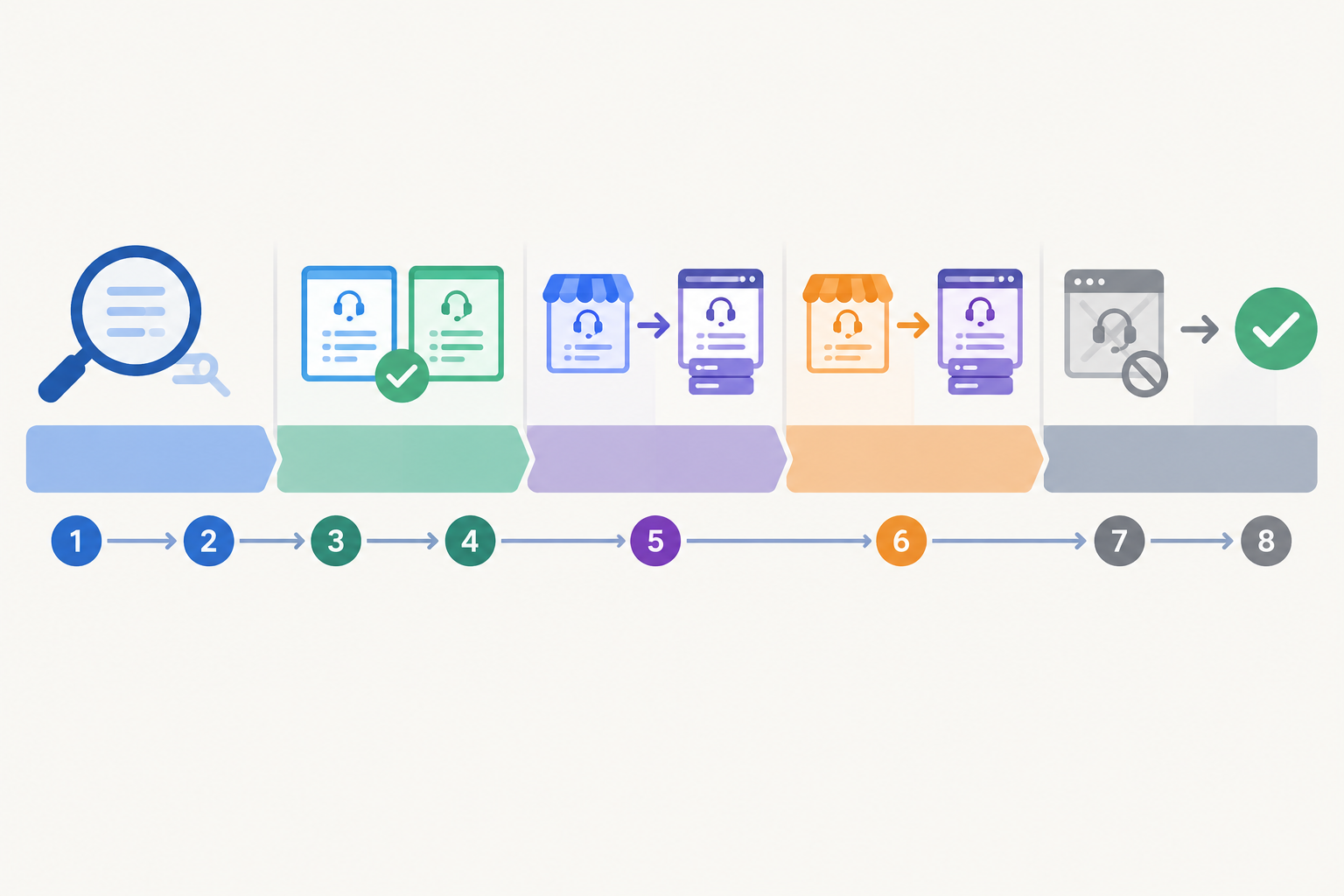
If an exit test isn't passed, extend the overlap rather than pushing on. A week's delay is cheaper than a lost inbox.
Notice how little of that is about software setup. Creating a new inbox can take minutes. The weeks go on planning, data clean-up, testing and communication.
Common mistakes to avoid when consolidating support tools
Most of the problems I see are avoidable. Watch out for these:
- Cancelling old tools before the export has been checked. Verify first, cancel later.
- Importing everything, including years of noisy, untagged tickets.
- Changing support email addresses without forwarding. Customers shouldn't have to keep up.
- Going live without testing routing, reply-from addresses and forwarding loops.
- Leaving ownership vague during the overlap, so two people answer the same email or nobody does.
- Forcing one brand voice onto every customer. Consolidate the tools, not the personalities.
- Skipping the baseline metrics, which leaves you unable to show whether it worked.
- Leaving the communication to the last minute.
Frequently asked questions about consolidating support tools
How do you merge two support inboxes without losing history?
Export your tickets and customer records from both tools, clean up duplicates, and standardise your tags before importing. Migrate one brand at a time, keep the old system in read-only mode for a defined overlap, and spot-check real customer records before you switch it off. Keep an archive of anything you don't import, so you can still find it if a customer or regulator asks.
What should be audited before consolidating support tools?
Audit your channels, tools, integrations, contracts, stored data and current performance metrics. For UK teams, also establish who is responsible for which personal data after the deal, check supplier contracts and access permissions, document your retention decisions, and check whether any international transfers need extra safeguards.
How do customers experience a support tool transition?
Mostly through what they see rather than the software itself. If replies stay quick, email addresses keep working and nobody has to repeat their story, most customers barely notice. Trouble appears when addresses change without warning or history goes missing.
Can we keep separate brand identities in one shared inbox?
Yes. A good shared inbox lets each brand keep its own chat widget, support address and reply tone, while your team works from one place and tags or filters conversations by brand.
How long does it take to consolidate support tools?
Many small and mid-sized teams can do it in four to eight weeks, including audit, migration and training, though larger or more complex setups take longer. The actual setup of a new inbox can take minutes, so most of the time goes on planning, data clean-up, testing and customer communication.
Ready to try one shared inbox?
Consolidating support tools after a merger doesn't have to be a heroic project. Audit carefully, bring over the history that matters, test your routing before customers rely on it, train people together and keep customers in the loop. If you'd like to see what a single shared inbox feels like for your brands, Sonny offers a 7-day free trial (no credit card, per its published terms), so you can set up your first brand and test the whole flow before committing. Start small, check it works, then bring the next brand in. You've got this. 💙